Archive for the ‘Cool new stuff’ Category

Review merge proposals in VS Code

Tuesday, September 8th, 2026

Launchpad Merge Proposals, a VS Code extension for reviewing Launchpad merge proposals, is now available on the Visual Studio Marketplace as a preview release.

The extension brings the review into the editor. It finds the merge proposals for the branch you have checked out, renders their diffs in VS Code’s diff editor, and lets you comment and vote without opening a browser.

What the extension does

Finds the merge proposals for the branch you are on

It reads the upstream of the checked-out branch and lists merge proposals in both directions: outgoing, where your branch is the source, and incoming, where it is the target. Proposals can be filtered by status.

Renders diffs in the VS Code editor

Open Files Changed and the proposal opens in VS Code’s side-by-side diff editor, with syntax highlighting and the surrounding file for context. Files are decorated to show where comments already exist.

Puts comments next to the code

Published inline comments appear beside the lines they refer to, and new ones are drafted in the same place, with full markdown support. Drafts are stored on Launchpad, so a review started in the editor can be finished in the browser, or the other way around.
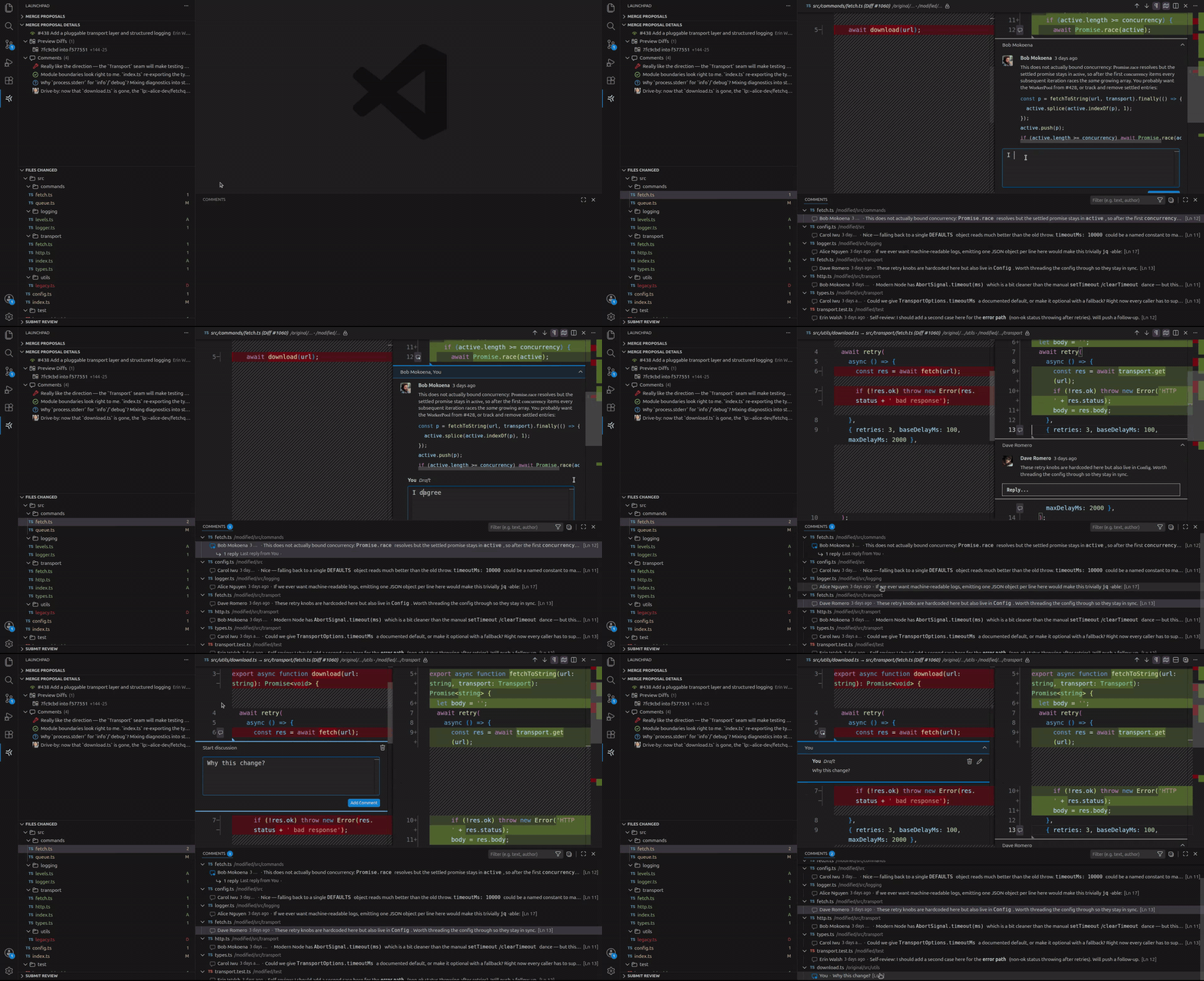
Submits the whole review at once

Pick a vote, write the summary comment, and submit. Every inline draft is published alongside it.

Getting started

  1. Install Launchpad Merge Proposals in VS Code 1.105 or newer.
  2. Open a project backed by a Git repository on Launchpad, and check out a branch tracking a remote one.
  3. Open the Launchpad Merge Proposals view from the Activity Bar and sign in when prompted.
  4. Select a merge proposal, then pick a preview diff to see the changes and comments.

Sign-in uses Launchpad’s OAuth flow, and the token is stored in VS Code’s secret storage. Launchpad asks what level of access to grant, and the level you pick determines what the extension can do. Reading diffs and published inline comments needs at least read access. Drafting inline comments and submitting reviews needs change access.

Current status of the project

This is a preview release. The core review flow works and we use it daily, but some capabilities are still experimental while we work out how they should behave. The README covers the current state, including a known issues section that we update with each release.

Feedback

We want to hear what works, what breaks, and what is missing. Please report bugs and file feature requests on the project’s Launchpad page.

The extension is free software under GPL-3.0, and its source is hosted on Launchpad. We welcome contributions via merge proposals. You can even review them using the extension itself!

Merge Launchpad merge proposals with one click

Friday, September 4th, 2026

Maintainers can now merge changes (merge proposals) directly from the Launchpad UI.

The new Request merge button is available to anyone with permission to push to the target branch. Launchpad enables it if the merge proposal has:

  • An active status and an up-to-date diff
  • No conflicts with the target branch
  • Approval from the target repository owner, a member of its owner team, or designated review team
  • Successfully completed any configured CI checks
  • No unmerged prerequisite branches

When you click on Request merge, Launchpad queues the merge, tracks its progress, and lets you know when the change has been merged.

The feature is available for all Launchpad-hosted Git repositories, with no additional setup or integration required.

Happy merging!

Introducing PPA Dependency Pinning

Thursday, September 3rd, 2026

PPA maintainers now have more control over where their build dependencies come from. With PPA dependency pinning, you can assign priorities to the PPAs your builds depend on, helping ensure that your packages build against the software you intend to use.

Whether you are testing a patch, maintaining a customised library, or preparing a new release, this feature makes it easier to manage builds that rely on packages outside the standard Ubuntu archive.

NOTE: This setting applies only to package builds performed by Launchpad and can only be set by the PPA maintainer. It does NOT change package selection on users’ computers, nor affect local builds.

Why dependency priorities matter

Personal Package Archives (PPAs) let developers build and distribute packages through Launchpad. When packages in one PPA require packages from another PPA in order to be built, the maintainer can configure the other PPA as a build dependency.

However, making a package available does not necessarily mean it will be selected. When multiple repositories provide the same package at the same priority, Ubuntu’s package manager generally prefers the newer version. APT’s documentation explains these selection rules.

Imagine that your application needs a library containing a patch you maintain in a separate PPA. Your builds will only use that library successfully until an Ubuntu update introduces a package with a higher version number. Subsequent builds will select the Ubuntu version instead, even though it does not contain your patch.

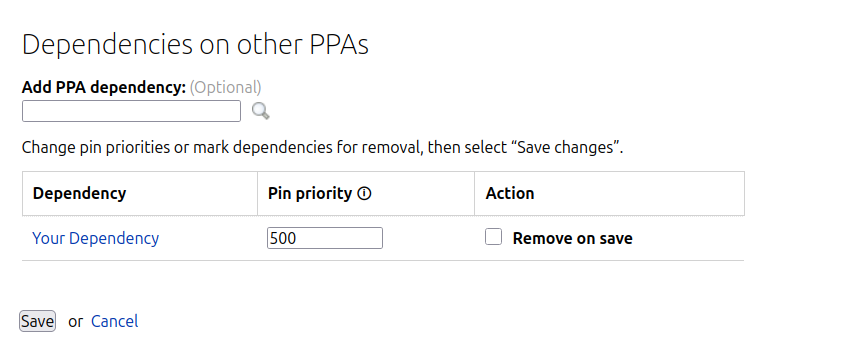
PPA dependency pinning gives you a way to express which source your builds should always prefer by allowing you to assign a priority to each PPA dependency. Launchpad applies those priorities when preparing the build environment.

For the patched-library example, an appropriate priority lets you keep using the library from your chosen PPA, even when Ubuntu publishes a newer version. This reduces the need to adjust package version numbers to influence which source is selected.

Who is this for?

The feature is useful for teams that:

  • Test fixes or features that are not yet available in Ubuntu.
  • Maintain customised dependencies for their applications.
  • Build related projects across several PPAs.

Configure priorities in Launchpad

When Launchpad prepares a build, APT resolves versioning conflicts by selecting the package repository with the highest priority. Some values already have conventional meanings: 500 is the default for available packages, and 990 is generally used for packages from the configured target release. Values above 1000 are especially strong and may cause APT to select a package even when it is an older version. See APT’s documentation for more information.

To get started, open your PPA’s Edit PPA dependencies page and adjust the Priority field beside the relevant dependency. Save your changes to apply the setting to subsequent builds.

For teams that manage their PPA configuration through scripts or automation, priorities can also be configured through the Launchpad API. This can be done through lp-shell as follows:

# Run: lp-shell production devel


In [1]: target_ppa = lp.people["your-launchpad-id"].getPPAByName(

    name="your-ppa-name"

)

In [2]: dependency_ppa = lp.people["dependency-owner"].getPPAByName(

    name="dependency-ppa-name"

)


In [3]: target_ppa.addArchiveDependency(

    dependency=dependency_ppa,

    pocket="Release",

    component="main",

    pin_priority=1001,

)

Existing dependencies retain the default priority of 500, so there is no configuration change required if the current behaviour meets your needs.

Priorities apply to packages supplied by the dependency PPA, so choose them with the contents of that PPA in mind. They express a source preference; they do not freeze a particular package version or guarantee identical builds over time.

Additionally, PPA dependency pinning only affects the build environment on Launchpad. It does not change package preferences on the computers of people who install software from your PPA.

References

For more information, see:

Make fetch service opt-in

Tuesday, October 28th, 2025

Launchpad Builders do not have direct access to the Internet. To reach external resources, they must acquire an authentication token that allows access to a restricted set of URLs via a proxy. This can either be a custom authenticated builder proxy or the fetch service.

The fetch service is a custom sophisticated context-aware forward proxy. Whereas the builder proxy allows requests to allowlisted URLs, the fetch service also keeps track of requests and dependencies for a build.

Users can now opt-in to use the fetch service while building snaps, charms, rocks and sourcecraft packages. You can read more about the fetch service here.

Why is the fetch service important?

To achieve traceability and reproducibility, artifact dependencies retrieved during a build must be identified. The fetch service mediates network access between the build host and the outside world, examining the request protocol, creating a manifest of the downloaded artifacts, and keeping a copy of the artifacts for archival and metadata extraction for each package build.

How to use the fetch service?

To be able to use the fetch service, users must opt-in. For snaps, charms, rocks and sourcecraft packages, the use_fetch_service flag should be set to true in the API. For snaps and charms, this setting is also available in the Edit Recipe UI page. 

The fetch service can be run in two modes, “strict” and “permissive”, where it defaults to the former. Both modes only allow certain resources and formats, as defined by inspectors which are responsible for inspecting the requests and the various downloads that are made during the build, ensuring that the requests are permitted. 

The “strict” mode errors out if any restrictions are violated. The “permissive” mode works similarly, but only logs a warning when encountering any violations. The mode can be configured using the fetch_service_policy option via the API. For snaps and charms, the mode can also be selected from a dropdown on the Edit Recipe UI page.

When to use the fetch service?

Use the fetch service when you need to keep track of requests and dependencies for a build, e.g., when you need to verify that the artifacts belong to secure, trusted sources.

Beta test: Git recipes

Monday, January 25th, 2016

If you are a member of Launchpad’s beta testers team, you can now try out Git-based recipes.  These work very similarly to the Bazaar-based recipes that Launchpad has supported for a long time, with a few minor changes to handle differences in the underlying version control system: the main thing you’ll probably notice is that you almost always need to explicitly specify a branch name.  The recipes documentation explains what to do; if you’re already familiar with how recipes work for Bazaar, then you should probably skip straight to the recipes guide to look over the differences for Git.

Please try this out and report any bugs you find.  If all goes well, we’ll open this up to all users in a couple of weeks.

Update: as of 2016-03-15, this feature is enabled for all Launchpad users.

Beta test: webhooks

Monday, November 9th, 2015

If you are a member of Launchpad’s beta testers team, you can now try out webhooks for Bazaar branches and Git repositories. These can be used to set up integration with external sites for various purposes, such as running CI jobs or publishing documentation. We expect to open this up to all Launchpad users soon, but in the meantime please do file a bug against Launchpad itself if you encounter any problems.

See our webhooks documentation for more details.

Update: as of 2015-11-20, this feature is enabled for all Launchpad users.

Launchpad news, April-June 2015

Thursday, July 9th, 2015

It’s been a while since we posted much regularly on this team blog, not least because for a while Launchpad was running more or less in maintenance mode.  That’s no longer the case and we’re back to the point where we can do feature development work again, as exemplified by our recent addition of Git code hosting support.

Lots of other things have been happening in the Launchpad world lately, though, and the half-way point in the year seems like a good time to start talking about them.  I’m going to try to do this a bit more regularly, aiming for about once a month when we also update our internal stakeholders.  This post covers roughly the last three months.

(more…)

Git code hosting beta

Friday, May 1st, 2015

Today we’re announcing early support for hosting Git repositories directly on Launchpad, as well as or instead of Bazaar branches. This has been by far the single most commonly requested feature from Launchpad code hosting for a long time; we’ve been working hard on it for several months now, and we’re very happy to be able to release it for general use.

This is distinct from the facility to import code from Git (and some other systems) into Bazaar that Launchpad has included for many years. Code imports are useful to aggregate information from all over the free software ecosystem in a unified way, which has always been one of the primary goals of Launchpad, and in the future we may add the facility to import code into Git as well. However, what we’re releasing today is native support: you can use git push to upload code to Launchpad, and your users and collaborators can use git clone to download it, in the same kind of way that you can with any Git server.

Our support is still in its early stages, and we still have several features to add to bring it up to parity with Bazaar hosting in Launchpad, as well as generally making it easier and more pleasant to use. We’ve released it before it’s completely polished because many people are clamouring to be able to use it and we’re ready to let you all do so. From here on in, we’ll be adding features, applying polish, and fixing bugs using Launchpad’s normal iterative deployment process: changes will be rolled out to production once they’re ready, so you’ll see the UI gradually improving over time.

What’s supported?

You can:

  • push Git repositories to Launchpad over SSH
  • clone repositories over git://, SSH, or HTTPS
  • see summary information on repositories and the branches they contain in the Launchpad web UI
  • follow links from the Launchpad web UI to a full-featured code browser (cgit)
  • push and clone private repositories, if you have a commercial subscription to Launchpad
  • propose merges from one branch to another, including in a different repository, provided that they are against the same project or package

What will be supported later?

Launchpad’s Bazaar support has grown many features over the years, and it will take some time to bring our Git support up to full parity with it and beyond. Git repositories use a somewhat different model from Bazaar branches, which we’ve had to account for in many places, and some facilities will require complete reimplementation before we can support them with Git.

Here’s an incomplete list of some of the features we hope to add:

  • useful subscriptions (currently only attribute change notifications work, which are not usually very interesting in themselves)
  • RSS feeds
  • mirroring
  • webhooks
  • an integrated code browser

See our help page for more known issues and instructions on using Launchpad with Git.

Helping out

This is a new service, and we welcome your feedback: you can ask questions in #launchpad on freenode IRC, on our launchpad-users mailing list, or on Launchpad Answers, and if you find a bug then please tell us about that too.

Launchpad is free software, licensed under the GNU AGPLv3. We’d be very happy to mentor people who want to help out with parts of this service, or to build things on top of it using our published API. Some preliminary documentation on this is on our developer wiki, and you can always contact us for help.

Launchpad JavaScript now combo loaded and faster than ever.

Tuesday, September 25th, 2012

Network graph of the combo loaded JavaScript.

Updated network graph

Back in January a side project was started to update the JavaScript used in Launchpad. Launchpad has been using YUI 3.3.0 for a long time, very successfully, however recent advances in YUI 3.5 and higher have added some great tools for development that Launchpad can take advantage of. In order to facilitate easier upgrades our YUI library version Launchpad has been moved to using a combo loader for serving out JavaScript.

This means, that instead of a single launchpad.js file that can be upwards of 3MB in size, each request builds a list of JavaScript modules needed for the current page to work, and the combo loader only sends down those modules. This drastically cuts down on the download size of the JavaScript for users. These combo loaded JavaScript files are also cached for speedy serving to other users of Launchpad.

The combo loader also allows us to specify which YUI version to load via a tweak to the url. In this way we can easily test new version of YUI side by side with the current stable version as they come out. This allows Launchpad to keep with future YUI released much faster.

We’re excited that today Launchpad has moved from YUI 3.3.0 to 3.5.1 and is now served by the combo loader. This change provides a faster experience for users along with easier maintenance and new JavaScript library features for developers.

We’ve still got more to do though. YUI just released version 3.7 and we aim to push that into production faster than ever before. Please let us know how these changes work for you.

Launchpad also wants to thank the folks over at YUI for continuing the great work on a tool that Launchpad heavily depends on.

Setting up commercial projects quickly

Wednesday, April 18th, 2012

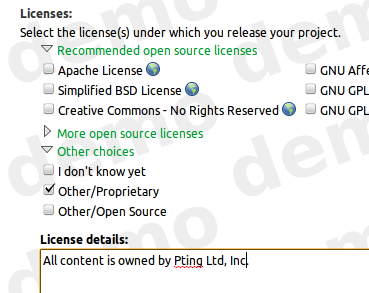
Setting up a commercial project in Launchpad has gotten easier. You can now quickly register a proprietary project and enable private bugs. You can create private teams and private personal package archives, AKA private PPA or P3A without the assistance of a Launchpad admin.

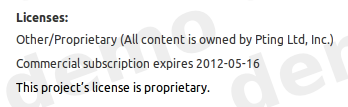
When you select the Other/Proprietary license while registering a project, or changing the project’s details,

it is given a complimentary 30-day commercial subscription.

The delay between the moment when a commercial project was registered and when the commercial subscription was purchased and then applied to the project caused a lot of confusion. During this delay, proprietary data could be disclosed. We chose to award the project with a short term commercial subscription which enabled the project to be properly configured while the 12-month commercial subscription was being purchased and applied to the project.

Any project with a commercial subscription can enable

Default private bugs
Once enabled by configuring the project’s bug tracker, all new reported bugs are private. You can choose to make the report public.
Default private bugs
Default private branches
You can request a Launchpad admin to configure private branches for your teams. (You will be able to do this yourself in the near future when projects gain proprietary branches.)

As the maintainer of a project with a commercial subscription, you can register

Private teams
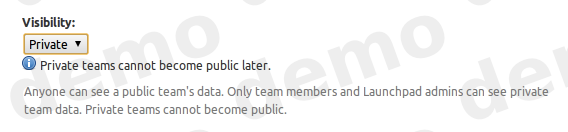
When you register a team, you can choose to set the team visibility to private. The team’s members and data is hidden from non-members.
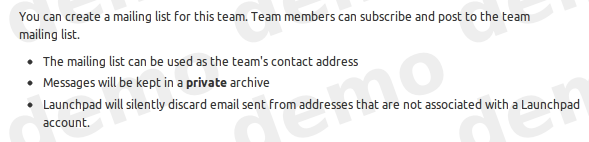
Private mailing lists
When you create a mailing list for a private team, the archive is also private. Only team members may see the messages in the archive.
Private PPAs
When you create a PPA for your public team, you may choose to make it private; private teams can only have private PPAs. You can subscribe users to your archive so that they may install packages without revealing all your team’s members and data to the subscriber.

A secondary benefit of this change is that you can now try Launchpad’s commercial features before purchasing a 12-month commercial subscription. The features will be disabled at the end of 30-days. Your test data will remain private to ensure your data is not disclosed.

Any open source project may also have a commercial subscription to enable commercial features. You can purchase a commercial subscription at the Canonical store. Commercial subscriptions cost US$250/year/project + applicable V.A.T.


(Photo by Fred Dawson on flickr, creative commons license)