Launchpad now on Twitter and identi.ca!
You can now follow Launchpad news and other updates through Twitter and identi.ca!
For news and status updates, take a look at:
Brad’s also running an experiment using TwitterFeed to give us:
TwitterFeeds takes the Atom feed of all bug reported against the Launchpad project and turns it into a stream of microblog posts.
Putting your project’s bugs into identi.ca or Twitter
If you track your project’s bugs in Launchpad, you can also turn them into an indeti.ca or Twitter stream. Similarly, you can create a stream of your project’s code branches, latest revisions or announcements!
Here’s what you need to do:
Step 1: Create an identi.ca or Twitter account — something like yourprojectbugs.
Step 2: Visit your project’s overview page in Launchpad and copy the relevant Atom feed URL.
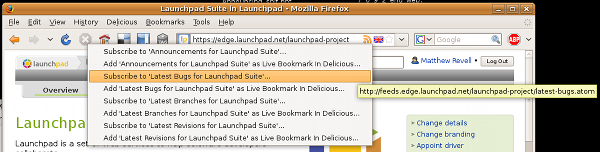
Step 3: Log into TwitterFeed using your OpenID.
Step 4: Give TwitterFeed the Atom feed and your identi.ca or Twitter account details.
And you’re done!
Let us know how you find our first steps in microblogging Launchpad.
Update: The instructions above now cover using TwitterFeed with laconi.ca based services, such as identi.ca. It’s also worth noting that TwitterFeed supports a maximum of five updates every 30 mins so this may not be ideal if you want to ensure you get comprehensive coverage.