Archive for the ‘General’ Category

Let’s explore

Tuesday, April 12th, 2011

Recently, Ursula and I have been improving the way that we test new Launchpad features.

Already, Launchpad has an extensive test suite but there are some things that automated tests can’t look out for. Rather than just testing the quality of our code, we also want to test the quality of the experience.

To do that, we’ve been doing more exploratory testing. Now, when a feature is getting close to deployment we will try out every part of the feature and make notes of anything in the experience that needs to be fixed before we release it. In particular, we’re interested in the feature’s:

  • ease of use and discoverability
  • completeness
  • quality of implementation
  • suitability to the problem it is solving
  • conformity to Launchpad’s principles and UI guidelines.

We’re also aiming to timebox the testing; something that takes too long to explore is likely too complex. For now, we’re using a 25 minute limit, as borrowed from The Pomodoro Technique, as it seems like a good starting point.

If you’re interested in what we’re doing, you can follow our progress both on the launchpad-dev mailing list and on the Launchpad dev wiki. Also, I’m hoping that we can get your help in testing beta features. I’ll write more about that soon.

Two months of squads: reviews and prospects

Friday, March 18th, 2011

Launchpad has been operating in the squad structure for two months now. From my point of view, things have been going very well.

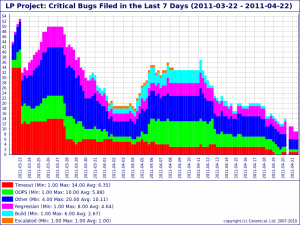
We are making steady progress on fixing timeouts, OOPSes, regressions and other operational issues.

The blue squad switched to maintenance after completing the ‘daily build’ project. The orange squad should follow-up soon once they complete the ‘sharing translations upstreams translations in Ubuntu’ project.

The cross-domain pollination is paying off. Having the API expert working as part of the squad finishing off the ‘daily builds’ work resulted in a long-due overhaul of our AJAX infrastructure. See the drive-by ajaxification of the blueprint page for the results! We saw similar things happen on the orange squad where the knowledge around the job system was put to good use.

I’ve got a lot of good feedback from developers who enjoy the enhanced focus they get in this new configuration.

As expected, the pace is picking up as the new squads learn to operate better together. The average of bugs closed per week went from 63 to 84.

At the last Thunderdome  (whole Launchpad team in person-meeting) where we kicked off the reorg, I issued a challenge: by the next Thunderdome (scheduled for the last week of June) we should:

  • have no timeouts with a cut-off at 9s;
  • have an empty critical bugs queue;
  • be on our way to delivering new features within 45 days on average

The next Thunderdome is now 3 months away. How are we doing?

Yesterday, Robert announced that the timeout was lowered to 11s. That means we have 2 seconds left to go! Looks like this is going well.

On the second point, we have today 224 open critical bugs on the Launchpad project. We started at 264. So on the surface, it’s not going well. The trick here is that there were a lot of issues that weren’t on the list. So we kept finding new issues as we fixed some, giving an impression of stasis. Over the last two weeks though, we have seen a constant drop in the queue length, so I hope that all issues are now recorded and that we are on are way to burning this queue down. The fact that we are now closing 34 of those per week on average (over 21 per week when we started) gives me comfort. We need to make that number go down by 16 each week to reach our goal. So it seems well within reach!

The last one is more challenging. We have a big structural constraint that would make it hard to achieve a cycle time of 45 days on new features: our DB deployment story. Most feature will require two DB patch iterations and we deploy those every 30 days.  Nonetheless, we could read this goal as getting slots free on our ‘Next’ queue. That means finishing off everything that we have in progress plus some things that we haven’t started yet. We have some big items on there. Things like derived distributions and getting our bug privacy manageable. That’s where our real challenge lie! I’m looking forward to see how this will go.

Get an overview of what we’re doing

Monday, February 21st, 2011

Ever wanted to know what exactly is happening in Launchpad development, but found our list of in-progress bugs too daunting and detailed? Well, do we have a link and a screenshot for you.

Screenshot:

Launchpad Overview Kanban

Link. (Log in: guest@launchpad.net; Password: launchpad).

Thanks to the nice folk at LeanKit Kanban, we’ve now got a guest account set up so that anyone can our kanban board. The board shows all of the high level features that we are working on (those are the green ones), the infrastructure projects we’re doing (those are the blue ones) and all of the community-driven work that we know about (the yellow ones).

The further to the right a card is, the closer it is to being done. The cards in the Next column are the things we’ll start to work on once we’ve got room on the board to start them. “UA” means we’re fixing the final few bugs in a feature before we consider it to be done, and “Deployment” means that we need sysadmins to do something.

Our goal is to keep the amount of work-in-progress down to a small number, and to be able to move things from left to right as quickly as possible. We hope making the board available gives you a better insight into Launchpad development, and maybe even encourages you to join in the fun.

Update: We’ve fixed the log-in credentials, for real this time. Sorry for publishing the wrong ones previously, and previously before that.

Launchpad’s UI is evolving

Thursday, February 17th, 2011

We are updating the UI over several iterations over the next few weeks for several reasons:

  • Launchpad should apply the Canonical guidelines for websites to take advantage of the research done for other sites. Being consistent with other Ubuntu and Canonical sites means there is less for users to learn about what the presentation means.
  • Launchpad has 730 style rules. Most are dedicated to defining exceptions, not standards. 730 rules is too much, too much for developers to maintain, too much for users to understand.

Many users have remarked about Launchpad’s recent the loss of colour.  We did this because:

  • It is hard to learn the meaning of so many colours.
  • It is confusing to see headings of different colour that have the same meaning.
  • Answers and Blueprints used blue, the same colour as links.
  • There were inappropriate uses of green that confused users who know that green means “perform an action without leaving the page”.
  • The were uses of orange and purple that users might mistake for Canonical’s aubergine and Ubuntu’s orange.

We appreciate your feedback, and we would like to hear more. There are also legitimate concerns being raised and we are not surprised because they are the same concerns we discussed.

1. Headers are harder to identify

Indeed they are. The old colours were hiding the font-size and whitespace issues that are still present in Launchpad. I am working on this issue right now. Launchpad uses many font sizes, and the percentage mechanism used does not render the size developers intend (font size smaller than default creates accessibility and usability difficulties). I think headers will be easier to understand when there are fewer, but distinct, font-sizes being used.

2. Buttons, callout actions, are hard to find

The links to report a bug for example look like normal links. They are hard to see. These important actions are no longer callouts. The only action that users can still find is the green download button…but that green does not mean “perform an action without leaving the page”. This is bad. We do know what to do about this yet. Maybe you can help. I think they need colour, they may need iconography. Look at http://www.ubuntu.com/ to see an example button and callout links. Launchpad does not have a colour at this moment. Launchpad does not have an obvious position along the axis described in the website guidelines (Canonical, corporate, aubergine)..(Ubuntu, community, orange). Launchpad definitely has both aspects; Canonical created Launchpad to build Ubuntu. I think there is a second axis for upstream projects (corporate and community, hosted and mirrored, Ubuntu and other OSes) that might need a colour. Most of the links that I think of are about participation in community, so I favour orange. But is this right? Does the orange also mean Ubuntu to non-Ubuntu users? Will the use of orange stop users from reporting a bug in the OpenStack project?

Bug search no longer does substring matching of source package names

Wednesday, February 16th, 2011

As part of improving performance we have disabled the substring matching of source package names. This fixes bug 268508 and bug 607960. However its a slightly contentious issue – opinions vary about whether bug 268508 is a valid bug or not.

So we have only disabled it – the code is still present and when we have more leeway on the performance of bug searching we’ll revisit this and look into some design and UI analysis to decide whether substring matching of this sort should be done or not.

For now though, there should be less timeouts in bug searches.

Silencing bug notifications for stuff you did

Friday, February 11th, 2011

Launchpad’s bug mail can be a bit chatty sometimes as I’m sure you’ve noticed.  This cycle the Yellow Squad is working to give you more control about the bug mail Launchpad sends to you.

One problem that we’ve known about for a really long time was reported as bug 548 and has recently been closed thanks to the effort of  Данило Шеган and Gary Poster.  Their fix allows you to globally specify whether you want to receive email about actions you did.

Most people probably do not need to be reminded of something they did a few minutes ago and will want to turn off those emails.  But, since this is new functionality we’ve preserved the old behavior unless a user changes the setting.  If you do nothing you’ll continue to get email about actions you instigate on bugs.

Opting out of those messages is easy.  Simply go to https://launchpad.net/people/+me/+edit and uncheck the box as shown below by the big red arrow.

opt out of bug mail

As mentioned, this is just the first of many features and refinements that we’re working on to help you customize the stream of bug mail coming from Launchpad to suit your needs.

Launchpad read-only 09.00 UTC 11th February 2011

Thursday, February 10th, 2011

In twelve hours from this posting, Launchpad’s web interface will be read-only, with other aspects offline, for around 90 minutes. This is to allow us to make an update to the structure of the Launchpad database. This replaces the previous read-only period announced for Feb 10th 2011 23.00 UTC.

Starts: 09.00 UTC 11th of February 2011
Expected back by: 10.30 UTC 11th of February 2011

There is a slim possibility that the Launchpad’s web interface will be completely unavailable. Because of circumstances beyond our control, the recovery procedure from the aborted roll-out wasn’t able to be completed within the time frame necessary for the previously scheduled window. In the case where it wouldn’t be complete for that next window, we will still complete the roll-out by taking the web interface offline.

I’m sorry that we’ve had to delay this period of service disruption on such short notice.

Launchpad offline 23:00UTC 9 February

Wednesday, February 9th, 2011

Launchpad will be offline for about 90 minutes while we roll out some changes to the database and to code hosting.

SourceForge code imports are disabled

Thursday, February 3rd, 2011

Following the SourceForge compromise, the SSL certificate for SourceForge subversion changed.

A bug on their end prevents us from automatically importing from their SVN repositories.

Until that bug is resolved, all SourceForge code imports are disabled.

2011/02/14 update: We re-enabled SF code imports since the problem was fixed on their end.

Announcing Launchpad squads

Monday, January 31st, 2011

We’ve made some changes to how we organise the Launchpad team!

We’re no longer divided into application-based teams (Bugs, Code, Foundations, Registry, Soyuz and Translations). Instead, we now have five cross-domain engineering squads: three focused on features and two on
maintenance.

How does this affect you?

When you want to speak to someone about a specific part of Launchpad,
whether for help, to escalate something or about an operational issue,
things have changed a little.

Specifically:

  • For help and any other operational issues related to Launchpad, you should either send an email to the launchpad-users mailing list, or file a question on the Launchpad project.  (Reminder: these forums are public.)
  • If your request would benefit from interactive discussions, drop by in#launchpad on Freenode where one of the people working on the maintenance squads will be able to help you. If your request isn’t suitable for public consumption, you can reach the same people on the #launchpad-ops channel onthe private Canonical IRC server.
  • To prioritize feature requests and to escalate other bugs, you should contact our product strategist.
  • You can also always bounce ideas to the developers list.

Short-term, we also expect some churn as people are exposed to areas they weren’t used to before. But down-the-line, we’ll have much more distributed knowledge coverage across the whole application.

How the squads work

The squads will alternate between “development project” and “maintenance” modes.

The three development squads will work on longer term projects, usually resulting in new functionality. Once such a squad has finished a project they’ll swap places with one of the two maintenance squads.

Bugs, operational issues and so on will be taken care of by the maintenance squads.

Deciding which development projects to take on will remain the responsibility of our strategist (Jonathan Lange) in collaboration with the Launchpad Stakeholders group.

You can find a list of who is in each squad on our dev wiki.

Why are we doing this?

Our app-based teams served us well, but were becoming a liability:

  • Many parts of Launchpad, such as Blueprint, didn’t have a dedicated team and were basically unmaintained.
  • Each team was responsible for both new features within their app as wel as maintenance. That slowed both of these.
  • Projects that required cross-app integration suffered from hand-off and coordination problem.

With this new structure, we expect to see:

  • Better cohesion across the application, as one squad will be responsible for the implementation of new aspects across the whole application.
  • Reduced cycle-time both for bug fixes and for new features as the context-switching will be removed.

It will be my pleasure to answer any questions you might have regarding this reorg.