

What you said: faster pages or more accurate bug counts
Published by Matthew Revell April 19, 2011 in Performance
Last week I asked what you’d prefer: faster loading pages that may have slightly inaccurate bug counts or slower loading pages where the bug counts were guaranteed to be accurate always.
Well, here’s the result:
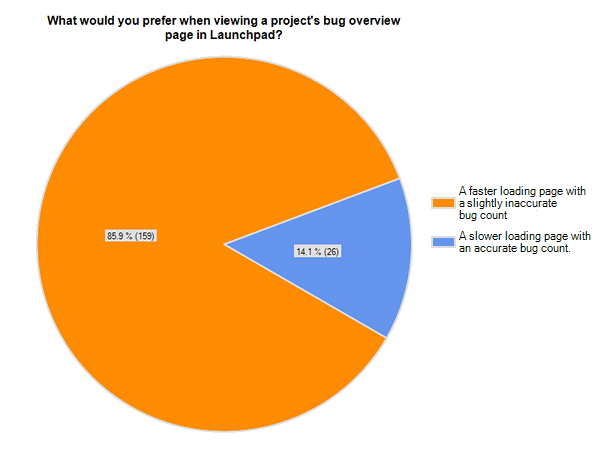
85.9% of the people who responded to the question said they wanted faster pages, even if it meant that some of the bug counts might be a little inaccurate.
I asked a similar question on Facebook and 88% of the people who replied said they’d rather have faster pages.
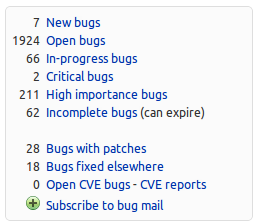
We’re not going to do anything just yet. First, we want to do some more research. If we did implement this, though, it’s likely to affect only those projects with private bugs and, even then, show up only in side-boxes such as this:
There’s more in the full discussion on the launchpad-dev list.
How to add a PPA to Ubuntu
Published by Matthew Revell April 18, 2011 in PPA
I noticed over the weekend that the search term bringing most visitors to this blog was “how to add a PPA to Ubuntu” and variants.
So, here’s a screencast showing you how.
For more, see our help guide.
Update: here’s a video showing how to do it with the Ubuntu Software Centre.
Launchpad is on Facebook
Published by Matthew Revell April 17, 2011 in General
Have you seen that Launchpad is on Facebook?
If you want to get Launchpad feature and development news through Facebook, like our page.
There are also our Twitter and identi.ca accounts, if you prefer those.
Why does Launchpad have 300 critical bugs?
Published by Matthew Revell April 16, 2011 in General

What does “critical” mean? And how is it that the number of critical Launchpad bugs has leapt up to almost 300?
Until January, we reserved the critical importance for near-disastrous issues such as data loss; stuff that just about never happens.
This was fine except that it didn’t fully reflect what we in the Launchpad team consider to be really important. So now we also use critical for bugs where:
- there’s a crash: you see one of Launchpad’s oops reports and can’t do what you wanted
- a timeout occurs: Launchpad takes so long to do what you asked that our timeout system kicks in to prevent rogue requests from sapping resources
- a supported browser can’t run Launchpad’s Javascript
- there’s a regression: we accidentally break an existing feature.
The principle here is: just as Launchpad should never lose your data, nor should it stop you from doing something because of poor engineering.
So, our critical bug count has shot up to around 270 because we’ve expanded what we consider to be critical.
Another reason is that we’re getting tougher on timeouts. Obviously we don’t want Launchpad pages to be so slow that they time out.
So, over the past nine months we’ve repeatedly lowered our timeout limit, meaning that we uncover more and more slow-loading pages. Each time a new page hits the timeout limit, we report a new critical bug and work to fix it. We don’t lower the timeout again until we have the failure rate below 0.01% of requests.
Our aim is to have zero critical bugs at any time. Once we get there, Launchpad will have no oopses and no timeouts. People are already talking about how Launchpad is faster to use and that’s largely thanks to the performance effort that our Technical Architect, Rob Collins, has been driving. There’ll be more about this performance work in coming blog posts.
If there’s a down-side to this focus on critical bugs it’s this: the bug that’s important to you may not get fixed as quickly as you’d like. This isn’t because we don’t consider such bugs important but because we’ve decided that the most important bugs are those that stop you dead in your tracks.
If you’re interested in following the performance effort, or the work to tackle these critical bugs, join the launchpad-dev mailing list.
Thanks to Rob Collins for his help with this post.
Photo by Brian Searle. Licence: CC-BY.
Survey: faster pages or accurate bug counts
Published by Matthew Revell April 14, 2011 in Bug Tracking

Rob asked on the launchpad-dev list whether people would mind seeing slightly inaccurate bug counts on some pages in Launchpad, if it meant the page would load faster.
So, if a project had 503 bugs its bug overview page might report that it has 500 bugs. However, for small numbers Launchpad would continue to report an accurate number, as the difference between three bugs and, say, no bugs is immense.
What do you think? Is a slightly inaccurate bug count a price worth paying for a faster page load? The survey closes 17.00 UTC Monday.
If you can’t see the survey embedded in this post, follow this link.
Create your free online surveys with SurveyMonkey, the world’s leading questionnaire tool.
What should be in our featured project list?
Published by Matthew Revell April 13, 2011 in General
 Back in September, I asked for suggestions for featured projects for Launchpad’s front page.
As it’s been more than six months, and we have so many exciting projects in Launchpad, I think it’s time for a refresh. While all the projects featured on Launchpad’s front page are still doing great work, it’s only fair to give some others a turn in the spotlight 🙂
So, which projects do you want to see on the front page and why?
Photo by Adrián Pérez. Licence: CC-BY-SA.
Meet Raphaël Badin
Published by Matthew Revell in Meet the devs
 Earlier this year, Raphaël Badin joined the Launchpad team as a developer.
Matthew: What do you do on the Launchpad team?
Raphaël: I’m a member of the Red Squad reporting to Julian Edwards and I’m currently working on the derived distributions feature.
Matthew: Can we see something that you’ve worked on?
Raphaël: Not yet because this feature is still in the works but once it’s released the changes will be pretty visible.
Matthew: Where do you work?
Raphaël: I work from my home in Paris, France.
Matthew: What can you see from your office window?
Raphaël: The other side of the street … over the rooftops I can see the very top of the Sacré Coeur.
Matthew: What did you do before working at Canonical?
Raphaël: Most recently I worked in a small Python/Django shop active in the field of participatory democracy and public participation. Before that I also worked in the banking industry.
Matthew: How did you get into free software?
Raphaël: I was introduced to Unix in college. When I started to work I had the chance to cross paths with free software zealots and was quickly convinced by the value of free software. I’ve been using Debian/Ubuntu ever since.
Matthew: What’s more important? Principle or pragmatism?
Raphaël: If you really want to choose between the two I would say it is something to be decided on a case by case basis 😉 … but I think they work hand in hand most of the time.
Matthew: Do you/have you contribute(d) to any free software projects?
Raphaël: Mostly small bug reports/patches to Django and Drupal.
Matthew: Tell us something really cool about Launchpad that not enough people know about.
Raphaël: The PPAs are nothing new but are a great way to build and distribute your packages for ubuntu.
Matthew: Is there anything in particular that you want to change in Launchpad?
Raphaël: I believe performance is a major part of the user experience and thus I would love to take part in the ongoing effort to improve Launchpad’s performance.
Matthew: Thanks Raphaël!
Let’s explore
Published by Diogo Matsubara April 12, 2011 in General
Recently, Ursula and I have been improving the way that we test new Launchpad features.
Already, Launchpad has an extensive test suite but there are some things that automated tests can’t look out for. Rather than just testing the quality of our code, we also want to test the quality of the experience.
To do that, we’ve been doing more exploratory testing. Now, when a feature is getting close to deployment we will try out every part of the feature and make notes of anything in the experience that needs to be fixed before we release it. In particular, we’re interested in the feature’s:
- ease of use and discoverability
- completeness
- quality of implementation
- suitability to the problem it is solving
- conformity to Launchpad’s principles and UI guidelines.
We’re also aiming to timebox the testing; something that takes too long to explore is likely too complex. For now, we’re using a 25 minute limit, as borrowed from The Pomodoro Technique, as it seems like a good starting point.
If you’re interested in what we’re doing, you can follow our progress both on the launchpad-dev mailing list and on the Launchpad dev wiki. Also, I’m hoping that we can get your help in testing beta features. I’ll write more about that soon.
Meet Huw
Published by Matthew Revell April 8, 2011 in Meet the devs
Earlier this year Huw joined the Launchpad to look after the user interface. Here’s a quick intro to who he is.
Matthew: What do you do on the Launchpad team?
Huw: I work on Launchpad’s user interface. This means I do a bunch of design work and front-end development. I work with developers and help them to create features with good user interfaces.
I come up with ideas for how we can improve our current interfaces and generally do whatever I can to make Launchpad look better and nicer to use. I’m still relatively new to Launchpad but I hope you will start to see the fruit of this work soon.
Matthew: Can we see something that you’ve worked on?
Huw: Most of the visible work I’ve been doing has been fixing bugs in various parts of our UI. Hopefully you might have noticed there are less small issues and breakages. If you use private bugs then be on the lookout for a new (more obvious) notification style soon.
Matthew: Where do you work?
Huw: I work from home in Sydney, Australia.
Matthew: What can you see from your office window?
Huw: I look out over some rooftops and trees. Sometimes in the evenings I get beautiful sunsets.
Matthew: What did you do before working at Canonical?
Huw: Most recently I worked for a travel software company in charge of designing the UI for a massive web application. I have also worked as a freelancer and also spent a few years working in tiny fast-paced creative agencies.
Matthew: How did you get into free software?
Huw: A friend of mine handed me a CD with the first beta of Ubuntu (Warty) on it. I quickly discovered a bunch of amazing open source software and I’ve been running Ubuntu ever since.
Matthew: What’s more important? Principle or pragmatism?
Huw: Principle. But that only works if you live in a vacuum. It would make my job a lot easier if Launchpad lived in a vacuum, but it doesn’t, so I often have to be pragmatic.
Matthew: Do you/have you contribute(d) to any free software projects?
Huw: A number of years ago I was heavily involved in Ubuntu Studio. In recent years I open sourced a user feedback app for Django that started out as
part of a personal project.
Matthew: Tell us something really cool about Launchpad that not enough people know about.
Huw: Oh! Oh! You’ll have to wait a bit longer but some of the guys have been working on a way to choose specific types of bug actions that you want
to get emailed about. A lot of people are about to have much happier inboxes.
Matthew: Is there anything in particular that you want to change in Launchpad?
Huw: I want Launchpad to be more personal. There are lots of things going on in Launchpad that do not concern me, and a lot that does. I would love
to make Launchpad do the work of finding that information instead of me.
Matthew: Thanks Huw!
Source package recipes
Published by Matthew Revell April 6, 2011 in Code, Cool new stuff, PPA

Here’s a quick pub quiz:
Question: How do you make packages for Ubuntu?
You can choose from the following answers:
- learn Debian packaging through hours of study and practice
- borrow existing packaging from elsewhere, throw a couple of Bazaar branches together and let Launchpad handle the rest
- Uruguay in both 1930 and 1950.
If you selected either of the first answers you’d be right.
Okay, so, if you want to do it for real — i.e. become an Ubuntu MOTU or otherwise create Debian-style packages from scratch — then you still need to go through the hard work.
However, for everyone else who really just needs to get something out there and working for, say, a group of beta testers, we now have Launchpad’s source package recipes.
How it works, in three steps
It’s almost ridiculously easy to set up a source package build:
- Choose a branch in Launchpad, whether hosted directly or imported.
- Write a short recipe that tells Launchpad which other branches to pull in, for example to provide packaging or make the code buildable.
- Paste your recipe into Launchpad.
And that’s it. Within a few minutes you can set up a daily build direct from your trunk or any other buildable branch in Launchpad.
Watch how it works in our screencast:
An example

Let’s say you’re the developer of a home finance application called Alvin. You track your project’s code using Git and host it on your own server. For the past couple of years Alvin has been packaged in the Ubuntu universe and your trunk has also been imported from Git to a Bazaar branch in Launchpad at lp:alvin.
Just as you’re approaching Alvin’s next release, you want to get some wider testing. In the past, you’ve published a nightly tarball and provided instructions on manual installation. That’s given you a handful of dedicated beta testers but you’re worried that you’re asking too much of people.
With Launchpad’s source package recipes, you write a short recipe that pulls in your trunk branch, adds the packaging from Alvin’s existing Ubuntu package and then builds an installable Ubuntu package in the PPA of your choice:
# bzr-builder format 0.3 deb-version 2.0beta+{revno}

lp:alvin

nest-part packaging lp:ubuntu/alvin debian debian
Paste the recipe into Launchpad and with a couple of clicks you have a daily build of your trunk, that’s published as an Ubuntu package in your PPA.
Now you can ask people to test the latest Alvin code by doing no more than adding your PPA to their system. Launchpad will build a new version of the package on each day it spots a change in your trunk (or the Ubuntu packaging). For your beta testers, any changes will show up just like any other Ubuntu update.
Simple as that!
Here’s a quick recap of how it works: you can take any buildable branch — whether hosted in directly Launchpad or imported from Git, Subversion, CVS or Bazaar hosted elsewhere — merge or nest other branches, add packaging and then leave it to Launchpad to create a daily build that it publishes in your chosen PPA.
Seeing it in action
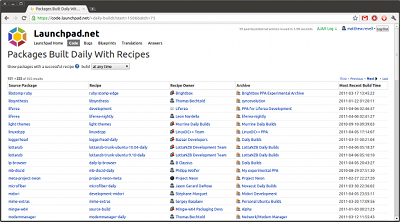
During the beta, people added a whole range of source package recipes, with a list of more than 350 daily builds as I write this.
Daily builds on Launchpad right now include Project Neon, who have around sixty recipes providing daily builds of KDE and Amarok. There are also daily builds of the Scribus DTP app, Audacity and the scriptable screen reader Gnome Orca.
Try it out
It’s easy to get your own source package recipes and daily builds up and running.
Start at our Getting Started guide and screencast.
I’ll leave the last word to Luke Benstead, who has been using source package recipes while developing a set of game libraries:
I’ve been using LP to develop some small open source game libraries. Because there are quite a few of them, packaging them all is a pain, so the package builds have worked out pretty well for them.
Now I get nightly builds delivered to a PPA, so I know that if I fix a bug it’s reflected to all my machines. And my recipes are only a single line so they’ve been really easy to use. I’m not really sure how they could be easier.
Images:
Beer photo by dearbarbie. CC-BY-SA.
Alvin Hall photo by Phil Guest. CC-BY-SA.
