

The Road Ahead
Published by Jonathan Lange January 8, 2010 in Coming changes
It’s my pleasure to introduce to you the single greatest Launchpad planning achievement for 2010: the roadmap.
For the last few months we’ve been working on bridging the gap between the Ubuntu distribution and the upstreams that it’s made from: making it easier for patches, translations, and bug reports to flow between Ubuntu users, Ubuntu developers, and upstream developers.
We’ve been asking users what they want and trying really hard to listen to them. And, of course, since we’re Free Software now, all of our discussion, development and planning is out in the open.
Still, there are a lot of people who care a lot about Launchpad but don’t have time to follow our mailing list or dev wiki. In particular, Ubuntu contributors are generally way too busy making Ubuntu better to keep up with every thread there. If people who care about Launchpad can’t keep track of what we are doing, they can’t tell us how we can do it better, and they can’t cheer us on when we’re doing it right.
We needed something to keep everyone in the loop. But it needed to be something simple, since we don’t want to spend all of our time telling people what we are going to do instead of actually doing it.
At Kiko’s urgings (perhaps inspired by Jono Bacon’s roadmaps), we’ve prepared a roadmap for the next few months of Launchpad development, in which the highlights are:
- Guiding developers to the most important (hottest) bugs
- Getting patches attached to bugs into the code review system
- Automatic imports into bzr from hg (we already do git)
- Ubuntu packages built fresh each day from the latest code
And of course, there’s more on the roadmap.
We intend to keep the page up-to-date and to keep the URL constant. This means that any time you want to know what we’re planning, you can look at that page and know for sure.
Remember, it’s an expression of intent, and not an actual commitment. If we can figure out a way to better connect the world of open source software, we’ll change the roadmap in a heartbeat.
For those who aren’t content with a high-level overview, you can also look at the 10.5 series on Bugs, Soyuz, Code and so forth. See the page for our current development cycle for a full listing. And, of course, you can keep following this blog for major announcements and items of interest.
I hope you enjoy the Launchpad roadmap, and I can’t wait to hear back from you. Have a great 2010.
2010 Launchpad Release Calendar
Published by Brian Fromme December 22, 2009 in Releases
We have published the 2010 Launchpad release calendar. You’ll see that there is a new Launchpad release naming scheme as well. We have moved to a YY.MM naming, which matches the Ubuntu model. You’ll find the calendar on the Launchpad development wiki, as:
https://dev.launchpad.net/Releases/2010Calendar
Having a public release calendar is particularly useful for anyone wanting to contribute to our open source project. It is also helpful for users to know when we’re likely to have down-time or read-only time.
The calendar doesn’t cover maintenance or system status. To keep up on that, please subscribe to:
http://identi.ca/launchpadstatus
Trying Out Launchpad Translations
Published by Jeroen T. Vermeulen in General, Translations
You may already know this: if you want to try out Launchpad, there’s a “playground” version of the site at https://staging.launchpad.net/
This site gets refreshed daily (or almost daily) with the latest copy of the database that’s behind the real, production Launchpad site. That makes it a good place to mess around: it’s pretty realistic but you won’t damage anything, and you won’t pollute Launchpad’s real database with fake information. It also runs newer code than the production site, so the Launchpad developers themselves use it for testing their latest changes.
Until recently, you couldn’t really test Launchpad Translations on the staging site: you needed help from an admin to get your templates imported, and if you got that done before they were overwritten by the daily refresh, you couldn’t export your translations. But today things are a lot better thanks to translation imports from, and exports to, bzr branches.
You will need:
- A Launchpad login. You can only get this on the real Launchpad; but it will also be valid on staging.
- At least one gettext translation template (“.pot file”) with strings from your program.
The translation template should have a filename in all lower-case letters and end in “.pot” as a filename extension. It should contain English “msgid” strings and empty “msgstr” strings as usual in the gettext format. (The msgstr strings don’t actually need to be empty, but in a template their contents will be ignored.)
You will be setting up:
- A bzr “development branch” on staging. This is how your templates get into the system.
- A bzr “translations branch” on staging. The system will write your translations into this branch.
Here’s how you set up and test translations on the staging site. With each of these steps, always make sure you’re working on staging, not on the production site! The staging site has the word “demo” scrawled diagonally across the page background. You may need to log in separately on this server; your account and password are the same as on the real Launchpad site.
1. Set up a project
You can do that on the project registration page. Or if you already had your project registered on the production site, it will show up in staging as well. In that case, just work with the project you have.
On the project’s main page in staging, select “Change details.” This takes you to the project’s setting page. Enable translations: check the box labeled “Translations for this project are done in Launchpad” and submit using the Change button at the bottom.
Your project should have a “trunk” release series. This is where you will be doing most of your work. Another release series will work just as well, but trunk is the default.
2. Set up a development branch
You may already have a development branch set up on the real Launchpad. But staging is a separate environment that does not have copies of your production branches, so you’ll have to set up a branch on staging anyway. Like everything else on staging, this branch will disappear when the staging site is refreshed.
The first thing to do is to make sure your bzr program is logged into Launchpad:
bzr launchpad-login mylogin
(Where mylogin stands for your Launchpad login name). Next you’ll push a branch to the staging server. How to do this depends on whether your project already has a bzr branch on Launchpad:
a. You have a bzr branch on your local system
You’ll have to push a copy of the branch to the staging server. Open a command-line shell and go into your branch. Then, supplying your own Launchpad login and project name in the obvious places, push the branch:
bzr push –use-existing-dir lp://staging/~mylogin/acme-zyzzyx/testbranch
This may complain:
bzr: ERROR: Target directory lp://staging/~mylogin/acme-zyzzyx/testbranch
already exists, but does not have a valid .bzr directory. Supply –use-existing-dir
to push there anyway.
If it does that, just run the command again and it should work.
b. You have a bzr branch on Launchpad
Go to the regular Launchpad page for the branch. The page will show how to access the branch using the bzr command-line tool. For example,
Get this branch:
bzr branch lp:acme-zyzzyx
(That is assuming that your branch is the main development branch for a project called “acme-zyzzyx.” Yours probably has a different name; it could also be of another form such as “lp:~mylogin/acme-zyzzyx/trunk”).
On your local system, go to some empty directory where you can create temporary data. Execute the “bzr branch” command line there. This creates a directory with your branch contents. Go into that directory, and push the branch to staging. You do this using the “bzr push” command:
bzr push –use-existing-dir lp://staging/~mylogin/acme-zyzzyx/testbranch
(Of course you use your own login and project name instead of “mylogin” and “acme-zyzzyx”). The “bzr push” command creates a real branch on staging. It may complain:
bzr: ERROR: Target directory lp://staging/~mylogin/acme-zyzzyx/testbranch
already exists, but does not have a valid .bzr directory. Supply –use-existing-dir
to push there anyway.
If it does that, just run the command again and it should work.
c. You don’t have a bzr branch
It’s okay if your branch is actually in some other revision control system such as subversion or git. Create a temporary copy of your source tree, so you can play without damaging anything. From the command line, go into the copy and run:
bzr init
Now use “bzr add” to add all the files that you want to see appear in the staging branch. For testing the only part that really matters is your translation templates:
bzr add po/messages.pot
Your directory structure and filenames may be different of course, but the filename should end in .pot. Commit your changes:
bzr commit -m “Setting up test branch.”
Congratulations—you have now set up a bzr branch for your project. Push a copy to the staging server. Supplying your own Launchpad login and project names in the obvious places, type:
bzr push –use-existing-dir lp://staging/~mylogin/acme-zyzzyx/testbranch
This may complain:
bzr: ERROR: Target directory lp://staging/~mylogin/acme-zyzzyx/testbranch
already exists, but does not have a valid .bzr directory. Supply –use-existing-dir
to push there anyway.
If it does that, just run the command again and it should work.
Make a note of that “bzr push” command line. You can make changes to the template later, commit them, and push them to the same location.
3. Set up a translations export branch
Besides import your template from a bzr branch, Launchpad can also export the template’s translations to a bzr branch. The real Launchpad site does this once a day, but since staging doesn’t do any of the heavy lifting, and data on staging doesn’t have so long to live, it does this every hour.
Let’s start with an empty branch for this that will contain just the translations. There can be good reasons to do it differently in your real project, but exporting to an empty branch is always a good way to start. That way you can make sure that the exports really do what you want them to before making Launchpad write to a real branch.
In some temporary directory on your system, run this from the command line:
mkdir translations-export-test
cd translations-export-test
bzr init
bzr commit –unchanged -m “Setting up translations branch.”
bzr push lp://staging/~mylogin/acme-zyzzyx/translations-export-test
(Here you probably see another complaint about “Target directory […] already exists, but does not have a valid .bzr directory.” Just run that last command line again to get past it.)
Make a note of the exact URL in that “bzr push” command. You’ll be pulling the exported translations from there into your local branch.
4. Configuring imports and exports
We now have two branches, one to import templates from and another to export translations to. Next we configure imports from your development branch and exports to your translations branch.
For the imports, tie your staging development branch to your project’s trunk release series. Go to the project’s main page on the staging server, and from there, click on to the “trunk” release series. The page you arrive at should have a section “Code for this series.” In that section, you may see a link to your real branch on production. The production branch won’t work on staging, so replace it with your development branch on staging. Click on the little “edit” icon next to the branch URL to go to the settings form. If no branch was tied to release series yet, click “link the branch to this series” instead.
You can now ask the staging server to start importing and exporting. Back on the “trunk” page, select the Translations tab at the top of the page. Look for a link “Set up branch synchronization,” and follow it.
This takes you to the page where translations synchronization with your branches is configured. It should show your chosen development branch (the one on staging!) as the import branch. Under “Import settings” select “Import template files” for now, and click “Save settings.” From now on, every time you commit a change to your translation template and push it to your development branch on staging, the latest version of the template will be imported to the staging server automatically. It usually happens within the hour.
Important: on the real Launchpad site, the development branch can also be a mirrored version of a branch you keep elsewhere. You can register an external branch (kept in CVS, Subversion, git, or bzr) and let Launchpad mirror it to a local branch. That automates the full transport from committing your template changes to your own repository on another server, all the way to having the changes show up in Launchpad Translations.
We’ll also want to set up translation exports on this page. Under “Export translations to branch,” you’ll see a link “Choose a target branch.” Selecting a branch will enable the exports immediately. (If an export branch has already been set, you’ll see its URL with an “edit” icon next to it. Clicking the icon will take you to the page where you set the branch.) Use the link to set your translations export branch.
Important: the translations export branch must be one that you own, and it must have been pushed to the server—just registering a branch is not enough. In the future it’ll also be possible to use a branch that is owned by a team that you are a member of. That plan is tracked in Launchpad under bug 407260.
At this point you have a viable working setup. As changes to your template (or even completely new templates) appear in your development branch, they are imported automatically. Snapshots of your translations are periodically exported to your translations branch. You may want to refine this further; I’ll go into that later.
5. Check up on the imports
Go to the translations import queue for your project. You’ll see links to the queue from the Translations pages for your project and for the trunk series. Within the hour you’ll see an entry for your template appear there. Its initial status will be Approved, which means it’s sitting in the queue waiting to be processed. Pending imports are processed several times an hour. Once your template has had its turn, if you refresh the queue page, its status will show as Imported (or Failed if there were errors).
Once your template has been imported, it will show up in the Translations page for your trunk series. You will see red bars for each of the languages you have set up in your preferences, standing for untranslated messages. The number of untranslated messages is indicated next to each. Until your template is imported, the red bars will show but not the numbers.
6. Translate!
Try clicking on one of the languages in the translations list with the red bars. This will take you to the template’s translation page: the UI for entering translations. Try translating one or more messages. Remember to hit “Save & continue” at the bottom to submit your changes.
Your changes are going to show up magically in your export branch. Remember the location you pushed your translations branch to on staging? Go back into your local copy of that branch and run, with that same URL:
bzr pull lp://staging/~mylogin/acme-zyzzyx/translations-export-test
Most likely, nothing will happen and the command will just say “no revisions to pull.” But keep trying! Sometime within the next hour, your latest translations will be written into the branch. When you set things up on production, you may want to set up an automated job (e.g. using “cron”) to pull snapshots of your latest translations to wherever you like to keep your translations.
7. Update the template
As your program changes, so will your template. You’ll probably run the xgettext command to extract the latest message strings. But today, since we’re only trying things out, you can edit the .pot file in a regular text editor.
So edit the template in your staging development branch. Add a new message:
msgid “Launchpad translations test message.”
msgstr “”
Now commit the change, and push it back onto staging using the same URL where you pushed your development branch before:
bzr commit -m “Template update.”
bzr push lp://staging/~mylogin/acme-zyzzyx/testbranch
Your template’s entry on the import queue will go back to being Approved, and soon after that, will be imported again. Now go back to the translation page. The new message, “Launchpad translations test message” will appear in the same relative position where you inserted it into the template.
This is how your project’s translations in Launchpad will keep up with development. From time to time you’ll want to start work on a big new release while translators continue to work on the existing release. That’s where you create a new release series. Each series has its own branches and its own translations. If the same English string occurs unchanged between two release series, the two will share their translations by default; but the old release series will be less of a “moving target” for the translators as the English strings probably won’t change so much between updates as you focus on the new release series.
8. Import translations
Remember how we set up imports of templates only? You can auto-import translations (“.po” files) as well. Go back to the branch synchronization options (on the trunk page, under the Translations tab) and set the import option to “Import template and translation files.”
Now, go back to your development branch. Did you have any PO files in there? If not, copy the one that was created in your translations export branch to the same directory where your template is. Translate a previously untranslated message so that you can see the changes happening. Add the file to the branch with “bzr add,” commit the change with “bzr commit,” and finally re-run the “bzr push” command.
If you already had PO files in the branch, all you need to do is use the one-time import option on the branch synchronization page. Each PO file should be in the same directory as its template, and be named after its language code with the “.po” extension: de.po for German, pt.po for Portuguese, pt_BR.po for Brazilian Portuguese, el.po for Greek, zh_CN.po for Simplified Chinese and zh_TW.po for Traditional Chinese, es.po for Spanish, and so on.
Now wait for up to one hour (but probably less) for your PO file to appear on the import queue for your project. This time it will appear as “Needs review”; a script that runs about once or twice an hour will approve it automatically. (If it doesn’t, check that you followed the naming rules). It will be imported soon after that.
If you go back to the translation pages, you’ll now see that the changes you pushed into the development branch have become visible in the translation UI. In the translations overview for trunk you’ll see translated messages show up as green (translated) bars instead of red (untranslated).
Note: if you made a translations change in the branch for a message that you had already translated in the Launchpad UI, you may not see the change appear. Translation changes made locally in Launchpad override translations that are imported from elsewhere; you’ll see such changes show up as light blue in the status bars. This allows you to keep track of changes made in Launchpad, and if the project’s translations are centralized elsewhere, feed the changes back “upstream.” You should try to keep the differences minimal by making sure that improvements are fed back to the origin, and that changes made in Launchpad are real improvements.
9. Going full-circle
By now you’re probably thinking that it’s not very useful to import translations from one branch and export them to another. Things get much more interesting when you export the Launchpad translations back to the branch they came from!
This is actually possible if your development branch is hosted on Launchpad. There’s nothing stopping you from using the development branch as the translations export branch as well. If you do that, you’ve got full two-way synchronization between your branch and the Launchpad user interface. Your translators can work in the Launchpad UI, or they can edit PO files from the branch and push them right back using bzr.
We normally recommend that you import only your templates from a branch, and export your translations to a branch (which may be the same one). But depending on how you choose to use Launchpad, two-way synchronization of translation files can be useful as well. There are a few important things to keep in mind though.
First, the exported translations may not always be exactly what you expect. If you name your PO files after invalid language codes, like “de_DE.po” (should be “de.po”) or “zh.po” (should be either “zh_CN.po” or “zh_TW.po” depending on which language it really is), they will normally not be imported. The same can happen if you include other things than the language code in the filenames, such as the template name. But if these files ever do get imported, they’ll be exported with their normalized, proper names. So it’s possible to end up with both a de.po and a de_DE.po in your branch. Of these, only the correctly-named one will be updated and re-imported—de.po in this case—even though your translators may still try to work on the other one.
Second, the translations export will simply overwrite any files that were already there. There is no intelligent merging, and “merge conflicts” are ignored. If you set up translations export to your branch before the first import has happened, the export can overwrite translations that were in the branch. Make sure this is really okay before enabling the exports!
There’s also the risk of “crossing” translations: translator A makes a change in the UI, around the same time translator B pushes an updated PO file to the branch. If there are pending changes in the branch when the export is scheduled to run, the export will not happen so as to avoid overwriting the changed files. Of course this does mean that frequent changes to a large branch can stop the exports from happening.
Third, an exported translation file will not be completely identical to the original, even if there were no changes in the Launchpad UI. Messages can appear in a different order, and the file’s header is updated. You may want to try merging Launchpad’s exported files into the original branch manually to get past the initial changes.
So, before you set up two-way synchronization, always test the exports on an empty branch. The staging server is the ideal environment for this. Or if you do it on the real Launchpad site, remember to save space by deleting the experimental branch once you’re done with it.
10. Help! Staging refreshed and now everything’s gone!
This happens once a day, or depending on the circumstances, once every few days. If you still have your branches on your local system, and your project exists on the real Launchpad site, it’s not hard to set things up on staging again for another experiment. Just re-run the “bzr push” command lines for the branches and set up the imports and exports again.
Once you’re satisfied, we hope you’ll decide to set up translations permanently on the real Launchpad.
Better patch tracking and more in Launchpad Bugs 3.1.12
Published by Deryck Hodge December 16, 2009 in Bug Tracking
Launchpad’s 3.1.12 release has been a big release for the Launchpad Bugs team, despite it only being a two week development cycle compared to the normal four week cycle for Launchpad releases. This meant there was really only a week of development time for the bugs team. We’ve been anxious to really put some development effort to the plans we’ve been articulating at sprints and UDS over the last few weeks prior to the start of the 3.1.12 cycle, so we discussed in our team being very careful with our time during this short cycle so that we could end the year with a hint of the work to come over the next 2-3 months.
Better Patch Tracking
One of the things we’ll be working on over the next months is better patch tracking and reporting in Launchpad. The first fruits of this have landed with changes to distinguish patches in comments and to list patches separately on the bug page.
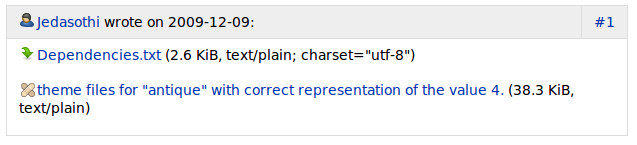
Now when you attach a patch to a Launchpad bug, the patch has a new icon to distinguish it from any other attachment.
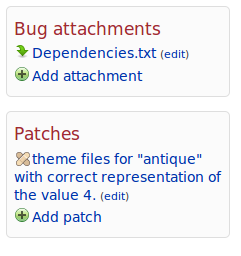
Patches are also now listed separately in the sidebar from other attachments on the bug page.
This work is part of the larger story of better patch tracking in Launchpad which will be one of three stories within the larger story of connecting Ubuntu, upstreams, and users that the bugs team will focus on in the next few months of development work.
Stopping Filebug Timeouts
Another nice change is the filebug work that Graham already posted about when he put out his call for early testing. This changes lands with 3.1.12 and filing a bug should rarely time out now.
Showing Affected Users
Also, Martin previously blogged about our now showing the number of affected users on a bug page. This is part of the story we’re calling Bug Q&A and also relates to our efforts to deliver a quality bug heat metric on Launchpad bugs.
More to Come From the Bugs Team
Each of these when taken on their own is not a large new feature, but it’s a nice bit of work for just a week’s worth of development. Hopefully, this will also give Launchpad users a sense of what is to come in the next few months of development in the Launchpad Bugs application. If you’re interested in following development on the Launchpad Bugs team, or maybe you’ve thought of contributing to the code, then you can check out the bugs team development plans on the Launchpad dev wiki.
Showing the number of affected users
Published by Martin Pool December 15, 2009 in Bug Tracking, Coming changes, Cool new stuff
Gavin just landed a very welcome branch to show the number of users affected by a bug on the bug page (bug 494040). You can also sort a list by the number of users affected, and doing this shows that two other popular bugs are related: provide a list of bugs affecting a user (283539) and show the number of affected users in a bug list (271332).
Needless to say, the bugs that affect the most users aren’t always the ones that should be fixed first. But it’s useful data, and more useful now that it’s easily available.
You’ll be able to use this after the release of Launchpad 3.1.12 on Wednesday the 16th December or on Edge right away.
Connecting Ubuntu, Upstreams and Users.
Published by kfogel in General
Since we started focusing on bridging the gap between upstream projects, users, and distribution packagers, we’ve been talking to a lot of people, to help us better understand the size and nature of those gaps.
(Those conversations are continuing, too — if you’d like to be a source, especially if you’re an upstream developer whose software is packaged in Ubuntu or Debian and you’ve seen bug reports, translations, or other data come to your project via Launchpad, then please see Matthew Revell’s invitation.)
Meanwhile, we’ve started to synthesize what we’re hearing so far. Recently I went through the raw data to distill it into key points. I filtered out some stuff that had nothing to do with bridging the gap, or that was only mentioned by one or two people. (Conversely, I kept some stuff that I know we’ve heard mentioned by multiple people, even though I may only be able to offer one or two citations here.)
Filtering notwithstanding, what’s interesting is how consistent a lot of the feedback is. The same points kept showing up over and over:
- Speed: Launchpad needs to be faster.
Cited by:
- Sandy Armstrong
- Jussi Schultink
- Ted Gould
- Marjo Mercado
- Jorge Castro
There is universal agreement on this. We’re working on it everywhere, as there isn’t one magic fix that will solve it for all of Launchpad.
- PPA-of-the-day is highly desirable! The easier it is for users to test, the more testing they will do. Therefore, instant packaging of latest upstream code would be awesomelicious.
Cited by:
- Scott Ritchie
- Sandy Armstrong (more or less)
- Carl Richell
- Ted Gould (see “continuous integration” in his page)
- Jorge Castro
Yup. We’re working on this right now.
- Forward bugs more easily, more quickly, and link upstream back to original reporter. (Bryce Harrington, for example, scripts Launchpad very heavily to get what he wants; he points out that the original reporter of a bug should not have to create an account in the upstream tracker to be contacted by upstream — simply having filed in Launchpad should be enough.)
Cited by:
- Sandy Armstrong (as an upstream, wants timely forwarding)
- Bryce Harrington (as a reporter, wants ease-of-forwarding)
- Jorge Castro
We’re trying to nail bug heat and bug Q&A first, but we’re keen to do this too.
- Branch/patch equivalence: Transform one into the other in one click, and push changes easily to upstream in the form upstream prefers.
Cited by:
- Jorge Castro
- Cody Russell (sort of)
- Sidnei da Silva
This is a high priority; we’re working on it!
- Be able to instantly see attributes of comments or commenters in a bug. E.g., tag the comment as “workaround”, have the commenter be displayed differently because of their role, their credibility, or some other quality. Seeing that kind of information in the UI would save a lot of time.
Cited by:
- Sandy Armstrong (sort of)
- Jussi Schultink
- Ted Gould
This would be great. It’s not on Canonical’s roadmap right now, but we’d certainly be interested in helping any community developer who wanted to have a go at it.
- Get more, better information from users in bug reports (e.g., many don’t say the version number of the software). Jussi Schultink mentioned some kind of LP-integrated screen capture would be great; I’m not sure how that would work, but it’s a neat idea.
Cited by:
- Sandy Armstrong
- Jussi Schultink
- Bryce Harrington
This is more a set of related ideas than a fleshed-out requirement, but bug Q&A is probably a step in the right direction.
- Launchpad’s search is ill-placed in the UI and/or ineffective
Cited by:
- Jussi Schultink
- Ted Gould
- Ryan Paul
Insofar as placement goes, that should be a relatively easy fix. As for functionality, we should identify exactly what is going wrong (the raw data has more details). On a semi-related note: probably a lot of the searching people do in Launchpad is with the expectation of finding a match somewhere in the vast bugs database, in which case the new inline dupe-finding may help improve that experience, or at least reduce the necessity of having it.
- Make it easier to find patches that distro should integrate. This could be a tool that would help everyone: not just Ubuntu, but other distros and upstreams too. Part of the trick is to look at other distros’ trackers for patches, not just at upstream.
Cited by:
- Jorge Castro
- (Others say this too, just happens not to be in the notes I trawled this time… but I know it’s out there.)
This is ultimately the “patch report” functionality that was discussed at UDS. While the full story is quite extensive and probably will not be in Launchpad 4.0, some of the sub-stories will be, in particular the parts that make it much easier to quickly see patches attached to Launchpad bugs, and to generate reports about patches.
- Better bug dup searching, better UI for handling bug dup scenarios
Cited by:
- Ted Gould
- Marjo Mercado (esp bugs in other trackers)
- Access to older PPAs would be great. (Then users could figure out when a bug was introduced, for example.)
Cited by:
- Scott Ritchie
- Ted Gould
- Cross-distro bug forwarding. E.g., LP copies a bug from Fedora’s tracker and then forwards it to the proper upstream.
Cited by:
- Sandy Armstrong
- Jorge Castro (in private conversation)
- More ways to view bugs. E.g., omit “fix committed” bugs from list.
Cited by:
- Sandy Armstrong
- Jorge Castro (IIRC, not sure it’s actually in his page)
Interesting that three of those last five related to searching & reporting.
I know much of the above just confirms the direction we’re already going, but I wanted to share it anyway. The emphasis on speed over features was a bit of a surprise to me; good to know.
If you’re really feeling squirrelly, go look over the raw data itself. I left a lot. out above; users have lots of ideas about how to improve Launchpad (as well as much praise for it), and it’s kind of fascinating reading: https://dev.launchpad.net/Strategy/RawData.
The interviewees were:
| Bryce Harrington | Canonical – X.org stack |
| Carl Richell | System 76. Linux computers, yay! |
| Cody Russell | Canonical – Desktop Experience |
| Jorge Castro | Canonical – Ubuntu Community |
| Jussi Schultink | IRC Council, Kubuntu / Ubuntu Studio |
| Marjo Mercado | Canonical – Ubuntu QA |
| Ryan Paul | Gwibber upstream |
| Sandy Armstrong | Tomboy upstream |
| Scott Ritchie | Packager, mostly for universe, esp WINE |
| Sidnei da Silva | Canonical – Landscape |
| Ted Gould | Canonical – indicators / sys status |
The sources include a fair number of Canonical employees. That’s just because we had easy access to them right away, while we were still tracking down upstream developers to interview. We will continue to talk to both, but our emphasis is now on upstream developers and on the people who bridge the gap between upstreams and distribution.
Read-only 22.00-23.00 UTC 16th December 2009
Published by Matthew Revell December 10, 2009 in Notifications
Launchpad’s web interface will be read-only from 22.00 UTC on Wednesday the 16th December 2009 for the release of Launchpad 3.1.12. During that time, other services including PPAs, code hosting and the email interface, will be offline.
Starts: 22.00 UTC 16th December
Expected back: 23.00 UTC 16th December
This is the final Launchpad code release of 2009! We’ll post the 2010 release calendar here in the next few days.
Follow Launchpad’s official status feed for full status information.
Inline dupe-finding: an exercise in pain reduction
Published by Graham Binns in Bug Tracking, Cool new stuff
For the last million years1 or so I’ve been working on a cool new feature for Launchpad Bugs: an inline, AJAXified, asynchronous dupe finder.
For quite some time now people have encountered timeouts or long response times when trying to file bugs, particularly when they enter a long bug summary or the project that they’re filing the bugs on has a lot of bugs through which Launchpad has to search in order to be able to find possible duplicates. The upshot was that whenever a timeout occurred people were unable to file a bug and would have to back up and start again. Needless to say, this was frustrating for all involved.
The new inline dupefinder, which you’ll now find on the “Report a bug” page of any project in Launchpad (when viewed on edge.launchpad.net) is designed to stop this from being a problem, or at least to reduce the problem to a more manageable level and stop it from getting in peoples’ way. It does this in two ways:
- The inline list of duplicates is much quicker to render than a full Launchpad page.
- If the search for duplicates times out for some reason you’ll still be able to file a bug.
Here’s the catch: we need your help. Launchpad’s development cycle this month is very short due to the approaching year-end holiday period, so we need to get as much testing done on this as possible. Check out the dupe finder, see if it works for you and, most importantly, report a bug if it doesn’t.
One last thing: at the time of writing, the inline dupe finder only works for projects (like Launchpad Bugs), not for packages or project groups. We’ll hopefully be enabling it for project groups today and with a bit of luck for packages, too. We started off with projects only because it’s the simplest implementation of the concept and it gives us a good base to test from.
Thanks in advance for your help. Let’s make Launchpad awesome together!
1 This might be an exaggeration.
Phone interviews about your Launchpad usage
Published by Matthew Revell December 8, 2009 in General
In the Canonical Launchpad team, we all use Launchpad every day. As you’d expect, we also have a lot of contact with people who use Launchpad, both for Ubuntu and other projects.
While personal experience of Launchpad and informal contact give us an insight into how some people use Launchpad and what developments we can introduce to help people do more, we want to cast the net wider.
That’s why, at last month’s Ubuntu Developer Summit in Dallas, I kicked off a new series of Launchpad user interviews.
The next set of interviews will be by phone, later this month, and I’d like to invite you to take part. It’ll take between 30 minutes and one hour and I’ll pay for the call 🙂 During the conversation, I’ll ask you some straightforward questions about how you use Launchpad.
Right now, I’m mostly looking for people who act as a bridge between Ubuntu and an upstream project. For example, you may work on an upstream project (whether or not it uses Launchpad isn’t important) and you occasionally check Launchpad to see what bugs Ubuntu users have filed against that project as it is packaged in Ubuntu. Or maybe you translate both for an upstream project and you work on translations for the project’s Ubuntu package.
That’s not a strict requirement, though: I’m interested in hearing from everyone who wants to talk about their Launchpad usage.
If you’re interested, send me an email (my first name dot my last name at canonical dot com) with a brief description of what you use Launchpad for and I’ll choose ten people for this initial set of phone interviews. Also, let me know your availability for a phone call.
Read-only 22.00-23.30 UTC December 3rd
Published by Matthew Revell December 3, 2009 in Notifications
Launchpad’s web interface will be read-only for 90 minutes from 22.00 UTC December 3rd. At that time, all other Launchpad services — including PPAs, bug mail and code hosting — will be unavailable.
Starts: 22.00 UTC 3rd December
Expected back: 23.30 UTC 3rd December
I’m sorry that we’ve had to disrupt your service twice in two days and for the short notice of this coming interruption. During our December 2nd code release we encountered some problems and decided to delay the roll-out in order to resolve them.
You can stay up to date with Launchpad system status by following our identica account.
