

Writing code for Launchpad
Published by Matthew Revell July 29, 2009 in General
William Grant was the first person outside Canonical to submit a patch to the newly open sourced Launchpad. I asked him a few questions to see how he got on.
Matthew: What did your patch change?
William: Launchpad users may elect to receive the bug’s description and status in the footer of each bug change notification email. This helps keep track of context when dealing with lots of different bugs.
Previously, bug emails that got to you through a team wouldn’t respect the setting — email coming through some teams would have the description, but for other teams it would be omitted. My fix ensures that the user’s selection is respected even for team emails.
Matthew: Why did you take the time to contribute to the Launchpad codebase?
William: I use Launchpad Bugs a lot, and get a lot of bug mail. This is an issue that has been irritating me for some time, and the fix seemed simple enough, so I decided it might be a good first task.
Matthew: How was it finding your way around the source tree?
William: It was easier than I expected. Most of the Bugs code now conveniently lives in lp.bugs, so I wasn’t overwhelmed with having to deal with the whole tree at first. The extensive test suite (particularly some good doctests) pointed me in the right direction, and developers and grep showed me the rest.
Matthew: How easy/hard was it to make your changes and stick to the Launchpad coding guidelines?
William: I didn’t get it quite right at first, but once pointed at the guidelines, it was simple to make my code compliant. It ended up looking a lot cleaner.
Matthew: What about the review process?
William: Remarkably easy. I found a reviewer (Graham Binns) on IRC, and submitted a merge proposal for my branch. A couple of hours and a few test changes later, my branch was approved. Graham landed it as soon as PQM reopened.
Matthew: What advice do you have for other people considering writing a patch for Launchpad?
William: Do it — it’s great to be able to fix those issues that have been bugging you for ages, and it’s not as hard as it looks. The test suite is a great guide through much of the codebase, and there are always developers on IRC to point you in the right direction if you get lost. The reviews are quick, developers are friendly, code style guidelines are clear, releases are frequent… all up it’s a very pleasant experience.
Matthew: Thanks William!
More power to the release manager
Published by Curtis Hovey July 28, 2009 in General, Projects
Last month we made a small change to the series page as a commitment to making a distinction between the driver for a project and the driver of a series. The drivers of a project have the power to make the decision of what features go into a release. But the driver of a series is special. Often a select number of individuals are delegated the awesome responsibility to define the intent of a series, manage all the milestones necessary to meet the goals, and to create the release. Series drivers are release managers.
When developers talk about the trusted persons who are making the release happen, they use the term release manager. While Launchpad recognised the role, it required the person also be a project owner, which is not always suitable for large projects. Release managers do not need the power to edit the project information, they need the power to edit the series information, create milestones, and release them. That is the power they now have.
A project owner can set a user, or a team as the series release manager from the series page. Project drivers also have the power to create a series; they have the power to start planning to be make themselves the release manger of the series they create.
What’s next
Distribution have release managers too, they have the same responsibilities as project release managers, but giving them power is a bit tricky. For distributions other than Ubuntu, release managers will be able to create series and milestones, and edit their details just as a project release manager.
Ubuntu must be handled as an exception; the gift of Soyuz and Translations is also a curse. Many special tasks must be performed before an Ubuntu series can be register a series in Launchpad. The release managers for an Ubuntu series will have more power to edit the series details and milestones.
Open Mind and Launchpad
Published by Matthew Revell in Projects
 Open Mind is an open source effort to create a database of common sense concepts. I asked Catherine Havasi, Rob Speer and Ken Arnold about the project and their use of Launchpad.
Matthew: Open Mind is almost the stuff of 1950s science fiction. You’re building a database of the ambient knowledge that we all take for granted, is that right?
Catherine: Yup. We’re looking to capture that intuition about the world that people have but computers and devices don’t. When you’re walking down the street you don’t need to worry about whether you will fall through the sidewalk. When you tell a friend you bought some groceries at the store, you know not to explain to them how money works. This kind of knowledge, knowledge about the relationships between everyday objects and knowledge about people feel about situations and goals, is critical for pretty much any AI task: from knowledge management for companies to robots interacting with the world around them.
Rob: And while we do our day-to-day work on the short-term applications of our system, we do keep the idealistic long term of AI in mind sometimes. It’s interesting that you should mention science fiction — one of the things that indirectly led to me joining the group was the goal of creating a computer system that could hold a conversation, perhaps like Mycroft in “The Moon Is a Harsh Mistress” or at least one of his stupider siblings. Using what I knew about natural language processing, I tried making a silly little discourse system or two, but I could see a clear barrier to them ever saying anything useful, and that was their lack of access to common sense.
So from there I changed my goal to the lower-level goal of getting this common sense knowledge into a computer in the first place, and joined the Open Mind Common Sense project.
Catherine: I’ve actually never been much of a science fictiony person — I tend to read mysteries. However, I’ve been a part of collaborative projects on the internet since the ’90s — before Wikipedia — and I always wondered how to harness the power of this sort of project for something like artificial intelligence.
Matthew: What uses do you envisage for this data, or is that not yet important?
Rob: Oh, it’s important. If we didn’t have applications we wouldn’t have funding.
Catherine: Recently we have worked on a lot of external applications. A few years ago, we developed an inference algorithm called AnalogySpace, which uses linear algebra techniques to find patterns in our common sense data. We then take those patterns and extend them to our entire data set — it’s a great noise-resistant way to do inference. We’ve also got a new technique called “blending” which lets us reason over other datasets with common sense added in. This is a good first step to the dream of using Open Mind as a sort of semantic glue in AI and in human-computer interaction.
Rob: We use these techniques to develop tools for our sponsors that can deal with natural language text according to its meaning (and not just what words it contains), and experimental user interfaces that adapt to what they think the user’s goals are.
Catherine: Our machine-learning toolkit, Divisi, is open source, so other people can build applications that use these techniques as well. We’re trying to make our community more open for others to use our stuff in a wide variety of applications — that’s one of the reasons we’re using Launchpad.
Matthew: How are you populating the database?
Rob: Currently we populate the database through our public website. Anybody who logs into that site can contribute new knowledge or vote on existing knowledge. We’re also working on improving that site (which is the openmind-commons project in Launchpad).
Catherine: In addition, we’re working on games you can play online which would help populate and refine the database.
Matthew: How do you programmatically show links between concepts?
Catherine: We have a semantic network called ConceptNet, which is constructed automatically from common sentence patterns in our contributed data.
Rob: When someone has told Open Mind a statement of the form “You can use an X to Y”, for example, this lets us add the semantic link “UsedFor(X, Y)”. ConceptNet has hundreds of thousands of these links. The combination of Divisi and ConceptNet can be quite powerful for representing semantics in a programmatic way.
Matthew: Where does Launchpad come in?
Rob: At this point, doing research on Open Mind requires working with a rather complex set of code. Our group’s Subversion repository wasn’t cutting it any more. It was also becoming very difficult to introduce the code to new people (whether they are new members of the group or collaborators). Launchpad is what we’re using to organize and distribute our code, and to build community around it.
Catherine: We’re especially interested in making what we do open and accessible to everyone. We can’t do this alone.
Matthew: Why did you choose Launchpad?
Rob: The first decision was which revision control system we should use. We needed something that would enable a distributed workflow.
Ken: …so that one person trying out their crazy idea for a new representation wouldn’t have to choose between breaking everyone else’s code and leaving it uncommitted for weeks.
Rob: It was important to make branching not painful, so we could release packages such as ConceptNet more often than the coincidental times that every part of the system was in a stable state.
Ken: We also wanted to open up our processes to the community; some external observers have mistakenly thought that the project was “dead” because they couldn’t see our internal work.
Rob: We first experimented with Git a bit. Not everyone could get their head around it. It felt like black magic. When you don’t completely understand the system, you can’t be sure it’s doing what you want. (I recognize the irony of this statement coming from a bunch of AI researchers.) After looking at other options, we settled on Bazaar, which fit into our workflow well and let us continue to use the Subversion idioms we were familiar with.
From there, it became a natural choice to set up a Launchpad account. Now we have a reliable place to look for all our code — as well as a lot of other tools for organizing our development, and a way of keeping our downstream users in the loop.
We intend to use Launchpad to distribute releases of ConceptNet and Divisi, track bugs, answer questions from users, and possibly even keep tabs on our documentation. (Currently, it seems a bit inconvenient to manage documentation using Launchpad. I’ve filed bug #334688 about a minor fix to Blueprints that would help, but it would really be nice to have a “Documentation” tab or something.)
Other aspects of Launchpad seem promising also — for example, we could make our translation project more high-profile if we figure out how to bring it from our own Rosetta installation over to Launchpad, and the “Mentoring” system seems like a good idea for giving projects to undergraduates, who often take a long time getting their bearings and figuring out what they want to do. (I should know.)
About Catherine, Rob and Ken
Catherine Havasi: I started as one of the co-founders of this project back in 1999 as an undergrad at MIT. I’ve been with it on and off for nearly ten years now. I took breaks to pursue other projects, but kept coming back to Open Mind because of the need for common sense. I’m currently finishing a PhD at Brandeis and will be soon starting a postdoc at MIT working full-time on Open Mind.
Rob Speer: I joined this project as an undergrad in 2005. I then made it the subject of my graduate research starting in 2006. After a couple of research ideas that didn’t really go anywhere, I worked on updating our knowledge collection site to make it start doing the things our papers said it should do, including asking relevant questions to expand its knowledge. I gave the site the working title “Open Mind Commons”, which stuck. I’m working toward a Ph.D. now, with a goal of improving knowledge collection across multiple languages.
Ken Arnold: I’m a second-year Master’s student at the Media Lab. My first task my first year here was to rewrite the Open Mind Commons site in Python/Django. I’ve been maintaining it ever since (enough to get fed up with it and pine for a rewrite — again!). I also have been helping with Divisi. I’m mainly working on my master’s thesis now, but somehow I keep finding myself working on this stuff.
Sharing translations between different releases
Published by Данило Шеган July 26, 2009 in Cool new stuff, Translations
Over the past few months we’ve been slowly introducing a grand new feature in Launchpad Translations, and with 2.2.7, we are finally ready to announce it to the wide world: message sharing.
Introducing message sharing
Message sharing between different releases of a product or distribution in Launchpad means that translations done in one release (eg. trunk) would immediately apply to translations in another release (eg. stable). This should benefit everyone using Launchpad for translations, one way or another.
- Translators will not have to worry about back-porting translation fixes to older releases anymore, and they can simply translate the latest release: translations will automatically propagate to older releases. Also, this works both ways, so if you are translating a current stable release, newer development release will get those updates too!
- Project maintainers hosting their translations in Launchpad, when they upload a template to a new release series and it gets imported, will instantly get all existing translations from previous releases shared with the new series and translators won’t have to re-do their work. They won’t have to worry about uploading correct versions of translated PO files, and can just care about POT files instead.
- For Ubuntu, there’s another benefit: opening a new release for translations will take minutes instead of days. Message sharing also improves the scalability of the system, and we should soon start seeing more performance improvements as the result of migrating to this new way of managing translations.
How to benefit from message sharing?
Over the next few weeks, we’ll be migrating all existing projects to make the best use of message sharing. If there are any potential problems with existing projects, we’ll be emailing their maintainers and resolving it as we go along. Messages will be shared only between templates in one particular project, and only if they all have the same name. For Ubuntu, they will be shared only between templates in one particular source package, and again, only if they are of the same name.
For example, Ubuntu Jaunty and Ubuntu Karmic already share their messages. If you update a translation for one single string in Karmic GNOME Panel, and that same string exists in Jaunty GNOME Panel, Jaunty translation will be instantly and automatically updated to exactly the same translation.
If you want one particular release to have a different translation from all the other releases, that’s still possible. So, if you do not want a translation in Jaunty to be modified when a translation is changed in Karmic, you have that option too. Since we don’t expect this option to be used often, it’s hidden in the “zoomed in” view on each single message.
What next?
We’ll have to carry out a data migration for each of the projects using Launchpad Translations. Luckily, this migration will be completely transparent, so there’s nothing for anyone else to do. On the outside, nothing will change, until you start doing translations for more than one release series, when they’ll just be better.
New projects will get benefits of message sharing right away, and existing ones should be a bit patient because doing the migration takes some time, but allows to keep the full history of translations intact.
If you are interested to learn more, come talk to us on #launchpad on FreeNode, or join the launchpad-users mailing list.
Automatically import files to Launchpad using product release finder
Published by Curtis Hovey July 24, 2009 in Cool new stuff, Projects
Launchpad has a little known feature that is getting better. The product release finder is a process that runs everyday to locate new releases and import them to Launchpad. The process uses the series’ Release file pattern to locate files and import them to the appropriate release. It can even create releases for series. The process is robust and worth consideration if you want to upload large release files for your project.
The project owner and series release manager can set the Release URL pattern by the series edit page. The pattern is an ftp, http, or https URL with a glob (*) in the part of the file name that varies with each release for a series. For example:
http://widgets.dom/downloads/widget-2.*
describes all files that start with ‘widget-2.’. This might be the source for two different releases, widget-2.1.tar.gz and widget-2.2.3.tar.gz. The pattern will also match multiple files that belong to a single release, such as widget-2.1.tar.gz, widget-2.1.zip, widget-2.1.changelog.
Many projects choose to group files in series in a directory of their own, in which case the Release URL pattern would look something like:
http://widgets.dom/downloads/2.8/*
You can tell the product release finder to search multiple directories by using a glob for a directory. For example, if your project separates release files in directories for each OS then you can try
http://widgets.dom/downloads/*/widget-2.*
to scan downloads/ubuntu/widget-2.* and downloads/mac/widget-2.*.
Be careful to include the common part of the series in the URL, otherwise files from different series will be imported to the wrong series. Do not do something like:
http://widgets.dom/all-releases/*
because any file that looks like it has version information in it will be imported to one series.
In all cases, the product release finder will extract the version from the file name, and match it to a milestone name. It will create the milestone and release it if necessary. If a version cannot be extracted, the file is ignored.
The version numbers extracted from file names conform to Launchpad URL name rules. So if your release files have underscores or pluses in their version names, dashes will be substituted. Flavour information is also ignored in the file name. For example these file names yield these versions:
    emacs-21.10.tar.gz => 21.10

    vpnc-0.2-rm+zomb-pre1.tar.gz => 0.2-rm-zomb-pre1

    warzone2100-2.0.5_rc1.tar.bz2 => 2.0.5-rc1

    furiusisomount-0.8.1.0_de_DE.tar.gz => 0.8.1.0

    glow-0.2.1_i386.deb => 0.2.1

    Bazaar-1.16.1.win32-py2.5.exe => 1.16.1
What’s Next
The product release finder should notify owners and release managers when there are problems with imports. A lot of problems were fixed recently, but there are two issues we are still seeing in the logs that indicate the Release url pattern must be updated for some projects. The product release finder cannot access the server or directory in some of the URLs. There are also a few URLs that have no glob. They appear to be the URL to a single file, where a glob is needed so that the series can have many releases. If the product release finder does not find your files after a few days, review the Release url pattern and check the remote site to verify they are fine.
We will update the UI to make the Release url pattern more prominent, and easier to set for each series.
Answer contacts can assign questions
Published by Curtis Hovey July 23, 2009 in General, Projects
Launchpad has supported assigning questions to users for several years, but the privilege was limited to project owners. This meant the feature was rarely used. Since the feature was also not visible, answer contacts often requested that we develop the feature. Question listing now include the assignee column. Answer contacts can assign a question to a user via the edit page. The assigned user will receive a notification about the assigned question. An assigned question will never expire; the assignee is obligated to answer the question.
The launchpad team had considered removing this feature two year ago because it was not popular. There were a few users who explained the need to assign questions to knowledgeable or privileged answer contacts. Simply put, the problem was not that assignment was unwanted, but that it could not be used by the people who needed the feature. The Launchpad team did not really understand how users were trying to use Launchpad until we decided to take turns answering every question asked to the launchpad project. We soon understood the need to assign questions to users. There are many questions that can only be answered by one or two people. The assignment must be visible to everyone, otherwise you would spend an hour reviewing open questions that were already assigned to someone. The cruelest part of assignment that that the assignee was never told that he has a task to complete.
This situation was especially frustrating for me because Answers is the application I started working on when I joined the Launchpad team. I knew that I could fix the issues in a few hours of work. Answers however, is not an application we are developing at the moment, I could not work on it during work hours. So I decided to fix the assignee feature on a Saturday. I could do this because the Launchpad on-call reviewer cannot easily say no to a merge request for a branch. I was also pretty certain my branch would be accepted because the reviewer is also answer contact who has experienced the assignee problems too.
The on-call reviewer rule is in place to ensure every patch is reviewed and given an opportunity to merge. This rule applies to everyone. Some Launchpad users have submitted patches for Launchpad pages and scripts and we have reviewed and merged them. Launchpad is now open source. You too can submit a branch knowing that someone must review it. Many of the Launchpad team members hack on Launchpad on our own time because we love Launchpad. Yet we still cannot fix every bug, or implement every feature. There are a lot of bugs that can be solved in a few hours work. If you want help to close a issue that you care about, we can help. Again the on-call reviewer is obligated try to advise on implementation issues. Also, Launchpad developers prefer to have pre-implementation plans to ensure that when someone decides to start a branch, it can be completed in less than two days and will be accepted by a reviewer. Someone on the #launchpad-dev channel on freenode can help.
Focusing on the Launchpad UI
Published by Martin Albisetti July 22, 2009 in Coming changes, General
Now that we’ve released Launchpad’s source code, our next couple of months of work are going to be mostly focused on our page layouts.
Launchpad has been around for quite a few years now, and tight release schedules packed with ever-changing features have had the side effect of us ending up with a lot of pages with different layouts.
In the next 2 months, we plan to fix that, and make sure every single page in Launchpad (452 templates!) has our new “3.0 look n’ feel”.
What does that look like, you may ask yourself?
Well, we’re still working on it, as we’re going to change the UI for the navigation (as well as tweak it’s functionality a bit, more on navigation in a future post). We do have rough draft which we’re starting to work towards, figure out what works and what doesn’t with real data, things we didn’t think about, etc.
The first major page we’re converting is the project overview page, currently being worked on by the world famous Curtis Hovey, and the initial draft should look similar to this:
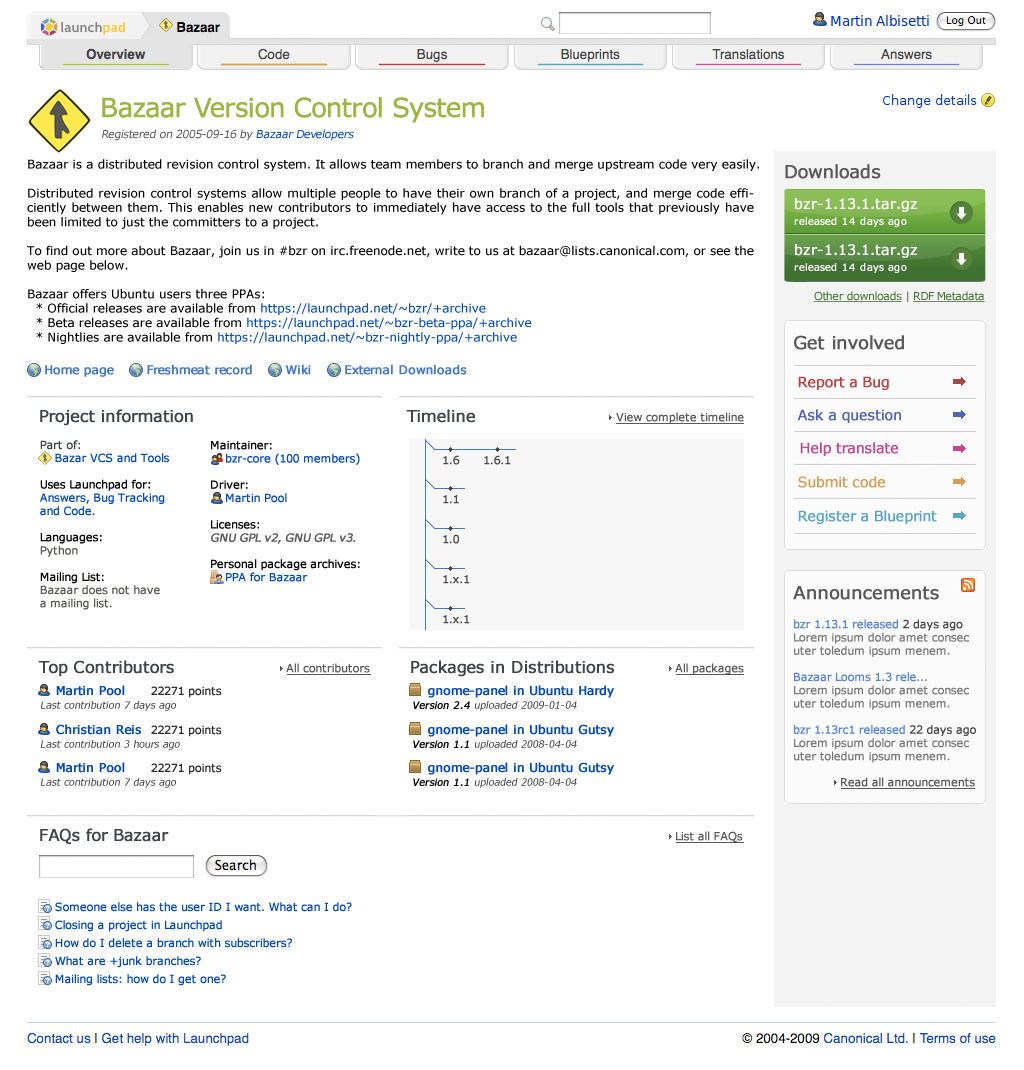
It’s important to note we’re still working on the UI, so the image above is our starting point rather than the end product.
Since it will take some time to make all the changes, we’re most likely not going to make a Launchpad release in August, and jump straight to September. Roll-outs to our edge server will continue to happen daily, and we’ll need your feedback on the changes more than ever. If you’re interested in helping us, just join the beta testers team.
Exciting times! 🙂
Launchpad is now open source.
Published by Karl Fogel July 21, 2009 in General
This is a post I’ve been looking forward to for a long time:
Launchpad is now open source!
We released it today under the GNU Affero General Public license, version 3. Note that although we had previously announced that we’d be holding back two components (codehosting and soyuz), we changed our minds: they are included — all the code is open.
Big congratulations (and thanks) to the Canonical Launchpad team, who worked overtime to make this happen sooner rather than later, and to Mark Shuttleworth, whose decision it was to open source Launchpad in the first place.
Rather than repeat the various release announcements, I’ll just point to them:
- launchpad-users mailing list
- Blog post at Canonical.com
- Press release
- The development wiki
- Instructions for getting the code.
The Canonical Launchpad developers will be on IRC in channel #launchpad-dev on irc.freenode.net. That’s the place to go for real time development discussion and questions. For usage issues, #launchpad is still the place, as before.
The mailing list is launchpad-dev {AT} lists.launchpad.net, which you can subscribe to by joining the ~launchpad-dev team. Again, that’s the development mailing list; user questions should still go to launchpad-users {AT} lists.launchpad.net.
Please bear with us as we learn how to be an open source team. Many of the Launchpad developers have open source experience already, of course, but as a team we’ve been working on Launchpad in-house for some years. This is a big change. We’ve been looking forward to it, though, and are ready and eager.
That’s all. Happy hacking :-).
-Karl Fogel
Git imports
Published by Jonathan Lange July 8, 2009 in Bazaar, Code
As you might have heard already, Launchpad can now import code from Git repositories. You can then create Bazaar branches of those Git repos.
For example:
bzr branch lp:git
Thanks to Jelmer for bzr-git and Michael & Paul for tying it into our rock-solid import system.
Launchpad privacy policy update
Published by Matthew Revell July 1, 2009 in Notifications
We have added a paragraph, concerning the location data on Launchpad user profile pages, to the Launchpad privacy policy’s “Submitted data” section. That section now reads:
“Launchpad users may add information about themselves via their Launchpad accounts and or their personal pages. This information may assist Launchpad in providing services to the contributor such as email notifications of changes to bugs, projects, teams, etc..
“Your Launchpad account has the option to store a location for you and to display it on your profile page. Until you set that location yourself, other registered Launchpad users can set it on your behalf. Once your location is set, you can hide it from other users.”
