Archive for the ‘Cool new stuff’ Category

Extra options when filing bugs

Friday, June 26th, 2009

You may have noticed that we introduced some useful new options when filing bugs. These are especially useful to anyone who files lots of bugs.

Something for everyone.

Everyone can now set tags when filing a bug. Previously, only people going via the advanced bug filing page would have the option.

One caveat: the tag field is not yet wired up with the magical tag auto-completer that you can use on the bug page itself, but that’s coming.

Something for bug supervisors.

If you’re filing a bug against a project for which you’re a bug supervisor, some additional fields appear in the new Extra options area (which is collapsed by default, but can be expanded by clicking on it). There are options to let you to set the initial status, the importance and the milestone of the bug, and also assign it directly to someone to work on.

If you have any problems with these new features, please file bugs against Launchpad Bugs, or talk to the help contact in #launchpad on freenode.

Series dashboards

Wednesday, June 24th, 2009

Up until now, series overview pages have offered a historical overview of a series. Today, we’ve released our new series overview pages that work much more like a dashboard for people driving a series.

Before we look at the new dashboards, let’s clear up some terminology: to clarify the difference between the roles, we’ve changed the name “series driver” to the more familiar term “release manager”. Most projects use series as lines of development that result in one or more releases and so it makes sense to reflect that in the role’s name.

Project drivers remain as they are.

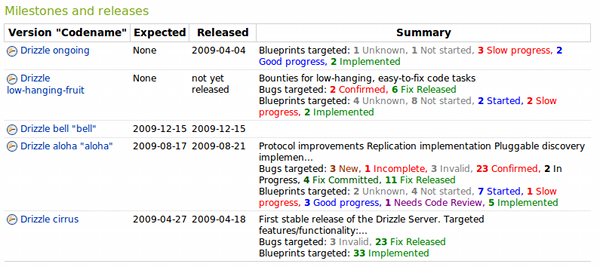
So, back to the new series dashboards: take a look at the page for Drizzle’s trunk series and you’ll see that the page now has a whole load of information that makes it easier to see the current state of that series. Perhaps of most interest is the Milestones and releases section.

Bugs and blueprints in the milestone section of Drizzle's trunk series dashboard

At a glance, you can see how much work is planned for the series’ upcoming milestones and the progress being made with those blueprints and bugs.

Further down on the page you get links to the series’ mainline Bazaar branch and details of packages associated with the series.

If you’re a series release manager, let us know what other information you’d find useful on the series dashboards.

Project timelines

Wednesday, June 24th, 2009

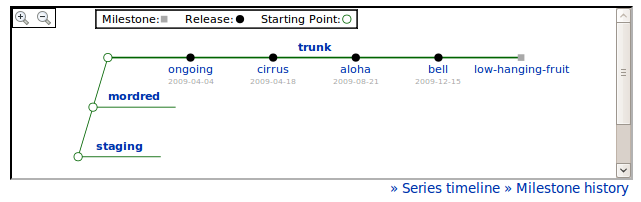
New on project overview pages: project timelines.

Timeline of the Drizzle project

Here’s the timeline from the Drizzle project. Straight away you can see how many series — i.e. major lines of development — are running concurrently, along with releases and milestones. Click on any of them to get more info.

Making bug migration that bit easier

Wednesday, June 17th, 2009

Greetings, readers!

For a while now I’ve been the Launchpad developer in charge of helping users of other bug trackers migrate their projects to Launchpad. We do this reasonably regularly for users of Trac, SourceForge and Bugzilla, and we’re always open to helping people migrate from other solutions should they wish to.

Several months back, the Elisa project migrated from Trac to Launchpad. In doing so, they wrote a script to take their Trac database and convert it to the Launchpad bug interchange format, which is an XML schema that we use for bug imports (you give us an XML document containing your bugs that conforms to the interchange format schema and we can then import it into Launchpad for you).

More recently, we realised that we were getting quite a few requests from Trac users for help with migration. We went back to the Elisa developers and asked if they’d be willing to let us have their migration tool under the GPL so that we could share it with everyone. They kindly said yes, passed the code to us under GPLv3, and yesterday I made it available on Launchpad as the Trac to Launchpad Migrator project.

It’s a bit rough around the edges at the moment and needs some documentation, but more than anything else it needs people to test it and use it so that we can make migrating from Trac to Launchpad as smooth as possible.

Update: Matthew’s written a blog post about our bug import format.

In-line bug tag editing and subscriptions

Wednesday, May 27th, 2009

There’s now more Ajaxy goodness on bug pages: in-line bug tag editing and also in-line subscriptions.

Both are simple actions that I always wished could happen without a page reload.

Have a look at the video I made or give it a go over on Launchpad’s staging environment without affecting real bug data.

View this video in Ogg Theora format.

Official bug tags

Wednesday, April 1st, 2009

In the latest release of the Launchpad bug tracker, we have introduced a new feature: official bug tags. Tags blessed by the project team as official display using a darker colour on the bug page, and are placed prominently at the top of the tags list on project pages. Users can still add tags that are not endorsed by the project as official, but they are encouraged to use official tags where possible.

Tags are a great way to group bugs together, and their free-form nature allows all users participating in bug tracking to invent new and interesting ways to categorize bugs. Many projects, after working with bugs for a while, discover that some tags fit their process. That using a certain tag is particularly helpful, or even required, to facilitate a regular routine. With official tags, the project team can indicate to the community what tags are encouraged, and use that to steer users away from duplication and ad-hoc invention and towards standardization.

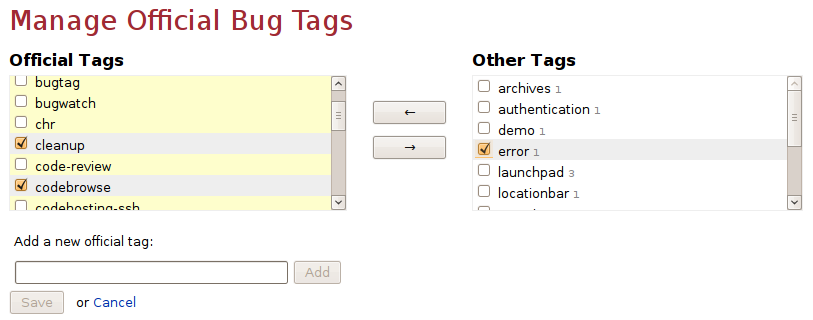
To decide which tags are official for your project, go to the project’s bugs page and click the link at the bottom of the tags list. The management screen has two columns. On the left, highlighted in yellow, is the list of official tags. The list on the right is of all tags currently in use. To make some tags official, select them in the right-hand column and click the left arrow button. The tags now appearing in the list on the left hand are official ones. You can also add a new tag to the list of official tags. When you’re done, click the Save button to record your changes. As an alternative, you can set the official tags for your project using the web service API.

We hope that official tags will help projects become better at tracking bugs consistently. We sure waited for this as Launchpad users, because until now we used to enforce the use of official tags, documented on the wiki, manually. Future work will expand and improve on this. Maris has written an amazing auto-complete widget, which will be used for tagging bugs starting in the next version and suggest to users what tags they can use as they type. We are also looking to let anyone who is a bug contact edit the official tags list, and in the longer term, also provide a way for project groups to share official tags and for allowing teams to document their chosen tags. Let us know how official tags are working for your project.

Import translation templates from your project’s Bazaar branches

Wednesday, April 1st, 2009

Now grows together what belongs together. Introducing a cool new feature: importing translation templates from Bazaar branches.

You can (and should) host your source code on code.launchpad.net using Bazaar branches. You also have a great translation tool in translations.launchpad.net that can help you to publish your project in many different languages. But so far, these two great applications lived seperate lives. This is beginning to change now!

How do you start translating your project into foreign languages? You start by generating a template file from your source code and uploading this to Launchpad. The translation template contains the English strings that translators are meant to translate into their language. What if the source code is hosted on Launchpad? Until now, you still had to upload that template manually to Launchpad Translations and wait for it to be imported.

Here is how it works now: generate the template file in your source tree using gettext tools, as you would have done before. But instead of uploading it, simply commit it to your Bazaar branch and push that branch to Launchpad. Now it just takes a one-time configuration step and your template file or files will be automatically imported into Translations. What’s more, this happens every time you push a new version of that file without you having to do anything.

To get started with importing translation templates from a branch, navigate to the “Overview” page of the release series of you project that you want to import translations into (usually “trunk”). Click on “Link to branch” to link this series to a Bazaar branch. If this has already been done, use this step to verify that this is really where your template file can be found. Next, go to the “Translations” page of that release series. You’ll probably see the message “No translatable templates available” but you are about to change that by clicking on “Settings” in the menu bar. Here you change the import mode to “Import translation files”. Once you click on “Save settings” an initial import of your translation templates will be triggered and you should soon find it in the import queue and shortly after that the template is available for translation work. Now, whenever you update the template file in your branch you just have to wait some 15 minutes or so and the change will appear in your translation template on Launchpad.

Read all the gory details on the help page and watch out for how in the future Bazaar branches and translations will grow even closer together.

People and teams get multiple Personal Package Archives

Wednesday, April 1st, 2009

The release of 2.2.3 brings with it a change for PPAs — we are now supporting multiple PPAs per person!

You will have probably already noticed that we made a change in 2.2.1 that altered the URLs you see for a PPA’s index page and its sources.list entry; these now have the extra “ppa” in there. This is actually the default name for the first PPA that anyone creates.
Example old-style URL:

https://launchpad.net/~mythbuntu/+archive

Which is now:

https://launchpad.net/~mythbuntu/+archive/ppa

You can create additional PPAs from your own profile page or your team’s profile page. You are able to name them whatever you like with one exception — we are not allowing you to name them “ubuntu”. This is so that we can maintain backwards compatibility with the old upload paths where you don’t need to specify the default PPA’s name.

To upload to the additional PPAs your .dput.cf upload path should look like:

incoming = ~myname/ubuntu/otherppaname

These additional PPAs will behave as any other PPA, the only difference being that they clearly belong to a person or a team, and you won’t need to create dummy teams/people to have more PPAs.

We hope you enjoy this new feature!

Opening the AJAX flood gates

Wednesday, April 1st, 2009

After many months on working on the necessary infrastructure to deploy complex AJAX widgets in Launchpad, more user interface reviews than any developer would like to go through in a life time, and a lot of cursing, the tip of the iceberg is finally showing.

Mark announced months ago the level of complexity we where aiming at achieving, and this last roll out of Launchpad actually places us very close to that.

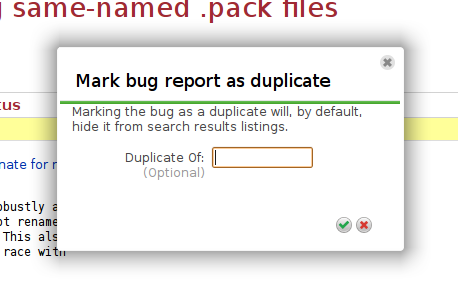
Micheal Nelson did some amazing work, and landed the first of many pop-up widgets, allowing you to mark a bug as a duplicate without needing to refresh the page:

You will start to see that some links in Launchpad are green, those will mean that you will get an AJAX experience instead of going to another page. Check it out in bugs:

Tom Berger and Abel Adeuring also switched to javascript ninja-mode, and cooked up a slick UI for managing official bug tags:

Links to external bug trackers right where you need them

Thursday, February 26th, 2009

Linking Launchpad bugs to upstream bugs can be hard work. You don’t necessarily know whether the bug is reported on the upstream tracker, and if you don’t know where the upstream project tracks its bugs you have to go and find out before you can file the bug and link the Launchpad bug to it.

We understand that this process can be a bit of a pain, so we’re introducing a feature that should make linking to upstream bugs a bit easier: Launchpad will now give you direct links to the bug search and filing forms in a project’s external tracker, so long as Launchpad knows the location of the project’s tracker and, if the tracker tracks more than one project, which project on the external tracker the Launchpad project refers to (so, for example, Launchpad needs to know that the Launchpad project ‘evolution’ links to the ‘Evolution’ product in the Gnome Bugzilla).

And because we know that a project maintainer shouldn’t have to go back to Launchpad and add the link to the remote project when Launchpad should be able to work it out for itself we’ve fixed that problem, too: Launchpad will check all the projects that are linked to a remote bug tracker and will try to deduce which remote project they’re linked to by looking at the bug watches that are registered against that bug tracker. Of course, this isn’t an exact science, and we’ll have to correct some of these auto-generated links manually, but hopefully it won’t take more than a few days for us to straighten out the kinks.

In order to get to remote bug tracker links, all you have to do is click Also affects project on the bug report and select the project that you want to link to. Launchpad will then offer you the links.

We’re going to be working to improve this further in the coming Launchpad development cycle, so keep your eyes on this blog for further information.