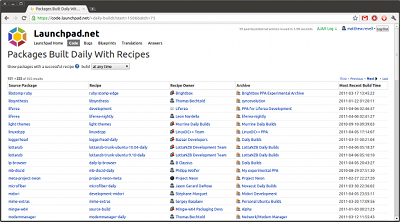
We’ve just upgraded Launchpad’s builder machines to Bazaar 2.4. Most importantly, this means that recipe builds of very large trees will work reliably, such as the daily builds of the Linaro ARM-optimized gcc. (This was bug 746822 in Launchpad).
We are going to do some further rollouts over the next week to improve supportability of recipe builds, support building non-native packages, handle muiltiarch package dependencies, improve the buildd deployment story etc.
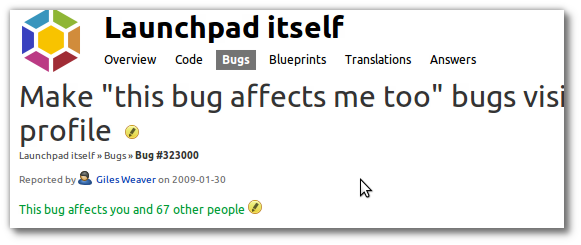
2: On a project, distribution or source package bug listing page, there’s now a “Bugs affecting me” filter on the right (for example, bugs affecting you in the Launchpad product).
Counts of the number of affected users already help developers know which bugs are most urgent to fix, both directly and by feeding into Launchpad’s bug heat heuristic. With these changes, the “affects me” feature will also make it easier for you to keep an eye on these bugs, without having to subscribe to all mail from them.
If you use gmail, you should now be able to send commands to Launchpad without gpg-signing.
gmail puts a DKIM cryptographic signature on outgoing mail, which is a cryptographic signature that proves that the mail was sent by gmail and that it was sent by the purported user. We verify the signature on Launchpad and treat that mail as trusted which means, for example, that you can triage bugs over mail or vote on merge proposals. Previously you needed to GPG-sign the mail which is a bit of a hassle for gmail.
(DKIM is signed by the sending domain, not by the user, so it doesn’t inherently prove that the purported sender is the actual one. People could intentionally or unintentionally set up a server that allows intra-domain impersonation, and it’s reported to be easy to misconfigure DKIM signers so that this happens. (Consider a simple SMTP server that accepts, signs and forwards everything from 192.168/16 with no authentication.) However, in cases like gmail we can reasonably assume Google don’t allow one user to impersonate another. We can add other trusted domains on request.)
If you have gmail configured to use some other address as your From address it will still work, as long as you verify both your gmail address and your other address.
You can use email commands to interact with both bugs and code merge proposals. For instance when Launchpad sends you mail about a new bug, you can just reply
  status confirmed
  importance medium

Thanks for letting us know!
As of recently, you have more control of what email Launchpad sends you about bugs.
Instead of bug subscriptions being all or nothing, you can now tell Launchpad exactly what bug-related events you want to hear about. And if you find you’re getting too much, or too little, detail you can change your subscription at any time.
What’s more, it’s now easier to filter the bug mail that Launchpad sends you.
Subscribing to an individual bug
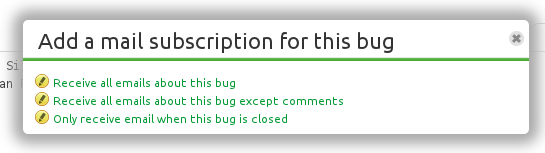
Let’s take a look at a bug report about Gwibber. Over on the right-hand side is the Subscribe link as usual. Clicking on it, though, gives us three new options for when Launchpad should email you about this bug:
a change is made to this bug or a new comment is added
any change is made to this bug, other than a new comment being added
this bug is fixed or re-opened.
You get to choose how much detail you want about the life of this bug, from receiving an email about everything through to Launchpad notifying you only when the bug is fixed or subsequently re-opened.
Editing a subscription to an individual bug
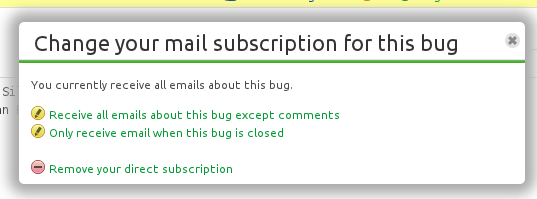
You can change your mind about your bug subscription. Simply click the Edit subscription link that appears once you’ve subscribed.
You get the same options, along with an additional option of unsubscribing entirely.
Subscribing to a project
You’ve been able to subscribe to all the bugs in a particular project or distribution (and milestone, series, packages within those) for a few years now. However, for anything but the quietest of projects this could bring a new intensity to the phrase “drinking from the fire hose”.
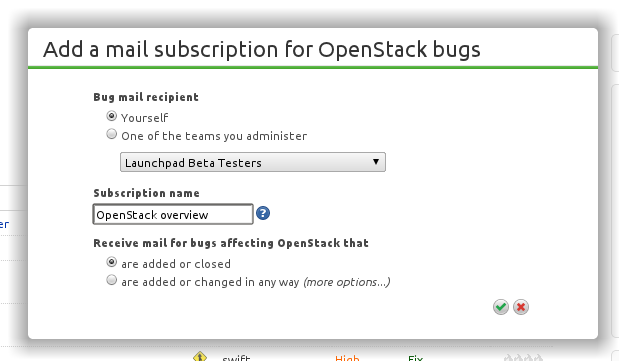
Now you can have sane subscriptions to these broader structures within Launchpad. Let’s subscribe to bugs in OpenStack to see how it works.
name the subscription — this gets added to the emails that result
choose whether you want to hear when a bug is opened or closed, or if you want to go into more detail.
So, now you have a subscription called OpenStack overview that’ll generate an email whenever a bug report is opened or closed in OpenStack.
Refining a project subscription
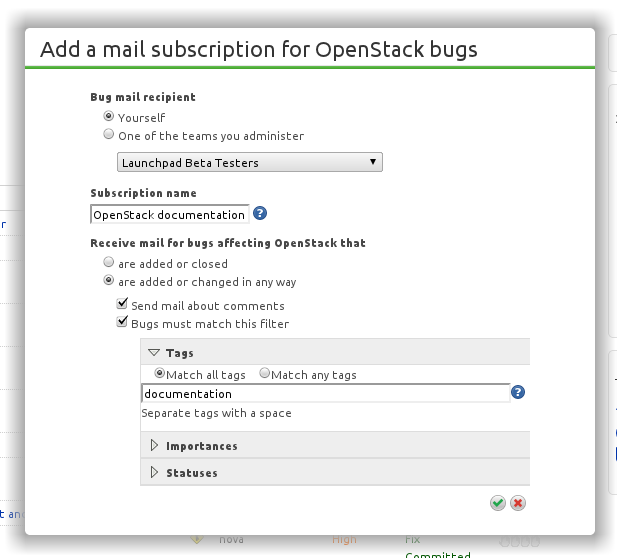
Let’s say you’re particularly interested in OpenStack documentation. No problem, you can keep your OpenStack overview subscription for everything else and add a more detailed subscription just for documentation bugs.
If that’s not enough, you can also filter by importance and status.
Muting bugs
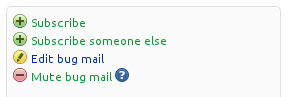
If a particular bug becomes too noisy, you can mute it. No matter how you’re subscribed to that bug — even if you have several subscriptions that generate email about that particular report — once you’ve muted it, you won’t hear about that bug again.
Of course, you can unmute it any time you like.
Unsubscribe in anger
At the bottom of every bug mail that Launchpad sends you’ll now find a link to edit your subscriptions to that bug. So, no matter how how you’re subscribed to the bug you’ll find all those subscription listed on that page and have the option to edit each of them.
You can also get to that page by clicking Edit bug mail on the bug page itself.
And there’s more
To help with filtering, Launchpad now adds a new header to bug emails:
X-Launchpad-Subscription
It quotes the name you gave the subscription when you created it. For Gmail users, all bug emails also feature the subscription name in the footer of the email body.
Launchpad has quite a few background tasks that update things outside of your browser request, and the only way you know that they finished is to reload a page to see if it changes.
Updating the preview diff on a merge proposal is one example.
At our Launchpad sprint in Dublin a couple of weeks ago, we added a so-called “long poll” where the browser opens a long-running connection using XHR (a background Javascript connection) to a new piece of infrastructure called the “long poll server”
This server is something that the Landscape team originally wrote and we’ve now open-sourced it so we can use it in Launchpad. The server connects to a RabbitMQ instance and relays information back to the browser when the background task completes so that the user doesn’t need to keep reloading the page – the page will automatically update thanks to the magic of Javascript.
The proof-of-concept is done but we now need to make it work in our production environment, which means making it more reliable, configuring the deployment and add some stats collection so we can see how it behaves. We’ll start off by only letting a small subset of people use it and grow it over time until we consider it stable enough for all users.
Over the past few months, my team have been working to make it easier to create and manage derivative distributions in Launchpad.
Although most of this will be of interest only to distro admins and contributors, we recently released a beta of a new feature that lets you visualize the differences between Ubuntu’s Oneiric series and Debian Sid.
There’s a new portlet on the distroseries page that will list the numbers of packages in both distributions, numbers only in Sid and numbers only in Oneiric. Clicking on the links takes you to pages that show the differences in more detail and allows you to request debdiffs and add comments on the packages.
Please let me know what you think of this change. We’re tracking bugs using the ‘derivation’ bug tag. Note that this is not meant to be a replacement for MoM – yet. We have a long way to go for that.
Coming soon, actual syncing from Debian to Ubuntu. Watch this space!
It’s incredible to think that more than 57,000 people have used Launchpad to translate software from English into their own language.
Many of them have worked directly on upstream projects, such as the OpenShot video editor. Others have helped translate Ubuntu packages of software. And then there’s a whole group of people who translate upstream software outside of Launchpad.
Today we’ve taken another step in bringing those efforts closer together by making it far easier to get upstream translations directly into Ubuntu.
We want the strings produced by translators working directly on software projects, whether in Launchpad or elsewhere, to be easily available to the Ubuntu translators and we believe it should be just as easy for software projects to take advantage of the work of Ubuntu translators.
How it works
Translation sharing between different releases of a project, or Ubuntu, has been available in Launchpad for some time now. Also, sharing translations between an upstream project translated in Launchpad and its Ubuntu package has been helping to bring those two communities of translators closer together.
What’s changed today is that strings from upstream projects who make their translations outside Launchpad are now just as easily imported and ready for use by Ubuntu.
Now, so long as the upstream project is set up in Launchpad to do this, a change made in an upstream project’s source code — whether hosted directly in Launchpad or elsewhere in Bazaar, Git, Subversion of CVS — will be available to Ubuntu translators just a few hours later.
Previously, Ubuntu took translation templates and files from the source packages as they were uploaded. There was no automated route for those new upstream translations to get into Ubuntu after that initial import. In effect, this allowed Ubuntu translations to diverge from upstream during the six month Ubuntu cycle.
This change has a nice side benefit of making it easier for upstream projects to make use of translation work done for Ubuntu, because the English strings will diverge far less and it will be easier to spot where the Ubuntu community has done new translation work, rather than their being a divergence due to the two efforts drifting apart.
To start with, this is available for projects that use intltools, which includes all of GNOME. To get your project’s translations automatically imported into Launchpad, see our help guide.
learn Debian packaging through hours of study and practice
borrow existing packaging from elsewhere, throw a couple of Bazaar branches together and let Launchpad handle the rest
Uruguay in both 1930 and 1950.
If you selected either of the first answers you’d be right.
Okay, so, if you want to do it for real — i.e. become an Ubuntu MOTU or otherwise create Debian-style packages from scratch — then you still need to go through the hard work.
However, for everyone else who really just needs to get something out there and working for, say, a group of beta testers, we now have Launchpad’s source package recipes.
How it works, in three steps
It’s almost ridiculously easy to set up a source package build:
Choose a branch in Launchpad, whether hosted directly or imported.
Write a short recipe that tells Launchpad which other branches to pull in, for example to provide packaging or make the code buildable.
Paste your recipe into Launchpad.
And that’s it. Within a few minutes you can set up a daily build direct from your trunk or any other buildable branch in Launchpad.
Watch how it works in our screencast:
An example
Let’s say you’re the developer of a home finance application called Alvin. You track your project’s code using Git and host it on your own server. For the past couple of years Alvin has been packaged in the Ubuntu universe and your trunk has also been imported from Git to a Bazaar branch in Launchpad at lp:alvin.
Just as you’re approaching Alvin’s next release, you want to get some wider testing. In the past, you’ve published a nightly tarball and provided instructions on manual installation. That’s given you a handful of dedicated beta testers but you’re worried that you’re asking too much of people.
With Launchpad’s source package recipes, you write a short recipe that pulls in your trunk branch, adds the packaging from Alvin’s existing Ubuntu package and then builds an installable Ubuntu package in the PPA of your choice:
Paste the recipe into Launchpad and with a couple of clicks you have a daily build of your trunk, that’s published as an Ubuntu package in your PPA.
Now you can ask people to test the latest Alvin code by doing no more than adding your PPA to their system. Launchpad will build a new version of the package on each day it spots a change in your trunk (or the Ubuntu packaging). For your beta testers, any changes will show up just like any other Ubuntu update.
Simple as that!
Here’s a quick recap of how it works: you can take any buildable branch — whether hosted in directly Launchpad or imported from Git, Subversion, CVS or Bazaar hosted elsewhere — merge or nest other branches, add packaging and then leave it to Launchpad to create a daily build that it publishes in your chosen PPA.
I’ll leave the last word to Luke Benstead, who has been using source package recipes while developing a set of game libraries:
I’ve been using LP to develop some small open source game libraries. Because there are quite a few of them, packaging them all is a pain, so the package builds have worked out pretty well for them.
Now I get nightly builds delivered to a PPA, so I know that if I fix a bug it’s reflected to all my machines. And my recipes are only a single line so they’ve been really easy to use. I’m not really sure how they could be easier.
A few weeks ago the Yellow Squad made another change to increase the relevance of the email you get from Launchpad by eliminating some noisy ones. A while back, Matthew Paul Thomas noticed that a change to a bug that was subsequently reverted could be deemed a mistake and was an action no one really needed to know about. As is his habit, mpt opened a bug (164196) with the suggestion that corrected actions not generate email.
So if Alice is assigned to a bug by mistake and then unassigned within five minutes no email is generated. Likewise, if a tag is added but then quickly removed the action does not cause any email to be sent.
Note that avoiding email requires that the action be undone, not just fixed. By that I mean the bug must be returned to the original state to be recognized as an undoing. So if you assign Alice to a bug by mistake and then change that assignment to Bob then the action will not be seen as a mistake. Email will be sent notifying about both assignee changes to Alice and then to Bob.
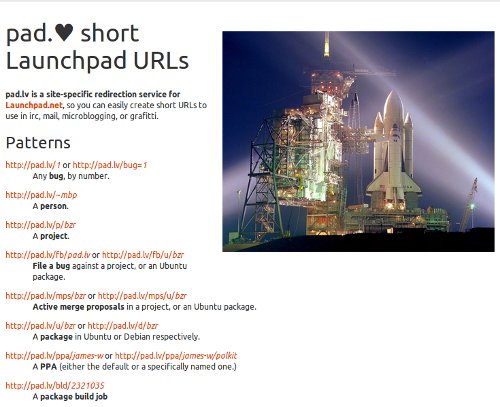
Sometimes you’d like to point people to an interesting bug in a project that uses Launchpad, like bug 685380 (that ‘1’ and ‘l’ may need to be more distinct in the new Ubuntu Font).
Typing out https://launchpad.net/bugs/685380 is a bit tedious, and it uses up a fair bit of space in a microblog entry. You can use any of innumerable URL-shortening services, but then the URL’s opaque; which is a shame since it really just wants to represent a 6-digit number.
Therefore: pad.lv (pad love), transparent short URLs for bugs, and other things including projects, people, bug-filing forms, packages, and more.


 Launchpad has quite a few background tasks that update things outside of your browser request, and the only way you know that they finished is to reload a page to see if it changes.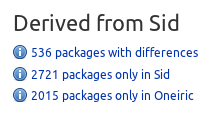
 It’s incredible to think that more than 57,000 people have used Launchpad to translate software from English into their own language.