Posts Tagged ‘announcement’

Review merge proposals in VS Code

Tuesday, September 8th, 2026

Launchpad Merge Proposals, a VS Code extension for reviewing Launchpad merge proposals, is now available on the Visual Studio Marketplace as a preview release.

The extension brings the review into the editor. It finds the merge proposals for the branch you have checked out, renders their diffs in VS Code’s diff editor, and lets you comment and vote without opening a browser.

What the extension does

Finds the merge proposals for the branch you are on

It reads the upstream of the checked-out branch and lists merge proposals in both directions: outgoing, where your branch is the source, and incoming, where it is the target. Proposals can be filtered by status.

Renders diffs in the VS Code editor

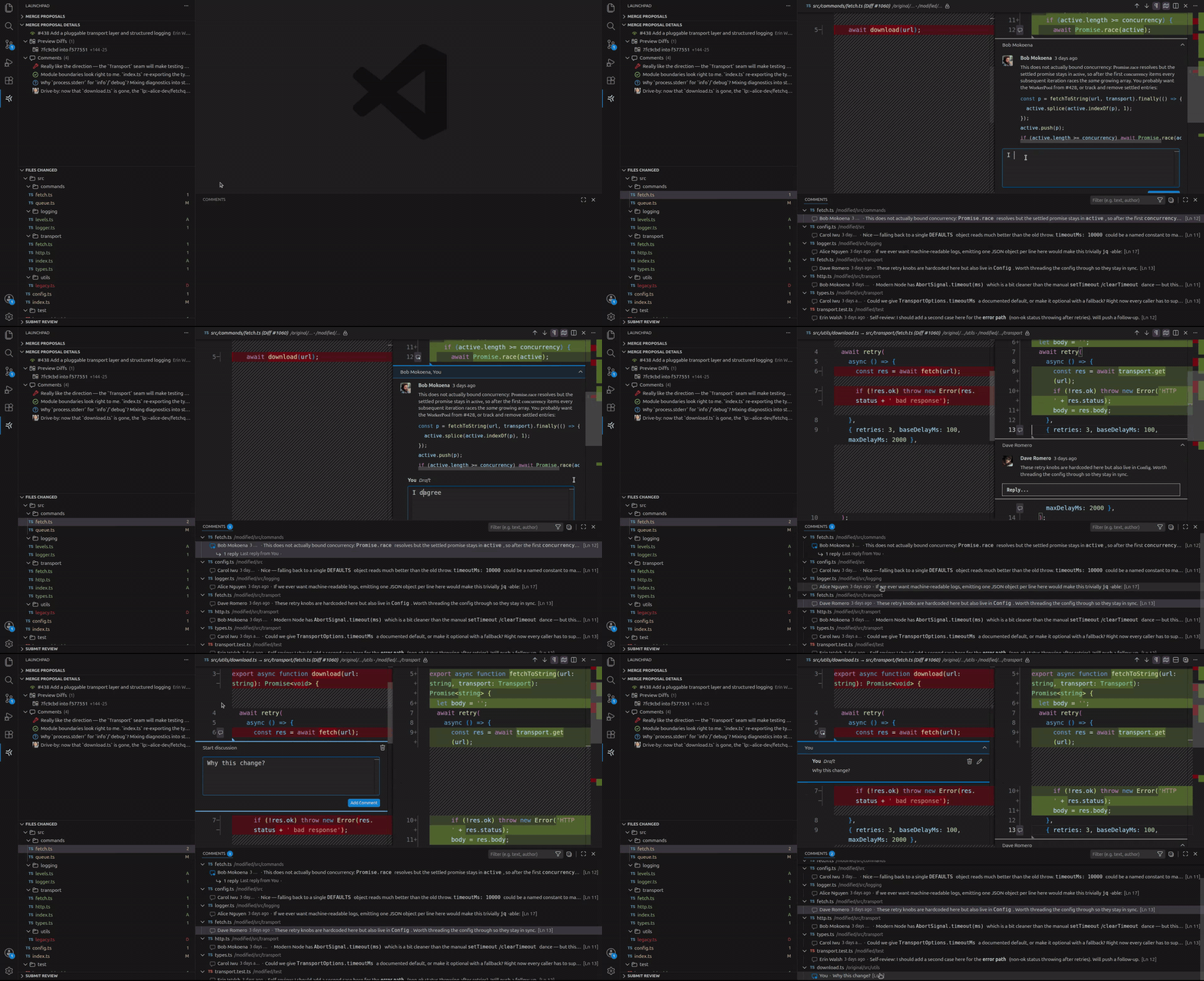
Open Files Changed and the proposal opens in VS Code’s side-by-side diff editor, with syntax highlighting and the surrounding file for context. Files are decorated to show where comments already exist.

Puts comments next to the code

Published inline comments appear beside the lines they refer to, and new ones are drafted in the same place, with full markdown support. Drafts are stored on Launchpad, so a review started in the editor can be finished in the browser, or the other way around.
Submits the whole review at once

Pick a vote, write the summary comment, and submit. Every inline draft is published alongside it.

Getting started

  1. Install Launchpad Merge Proposals in VS Code 1.105 or newer.
  2. Open a project backed by a Git repository on Launchpad, and check out a branch tracking a remote one.
  3. Open the Launchpad Merge Proposals view from the Activity Bar and sign in when prompted.
  4. Select a merge proposal, then pick a preview diff to see the changes and comments.

Sign-in uses Launchpad’s OAuth flow, and the token is stored in VS Code’s secret storage. Launchpad asks what level of access to grant, and the level you pick determines what the extension can do. Reading diffs and published inline comments needs at least read access. Drafting inline comments and submitting reviews needs change access.

Current status of the project

This is a preview release. The core review flow works and we use it daily, but some capabilities are still experimental while we work out how they should behave. The README covers the current state, including a known issues section that we update with each release.

Feedback

We want to hear what works, what breaks, and what is missing. Please report bugs and file feature requests on the project’s Launchpad page.

The extension is free software under GPL-3.0, and its source is hosted on Launchpad. We welcome contributions via merge proposals. You can even review them using the extension itself!
Merge Launchpad merge proposals with one click

Friday, September 4th, 2026

Maintainers can now merge changes (merge proposals) directly from the Launchpad UI.

The new Request merge button is available to anyone with permission to push to the target branch. Launchpad enables it if the merge proposal has:

  • An active status and an up-to-date diff
  • No conflicts with the target branch
  • Approval from the target repository owner, a member of its owner team, or designated review team
  • Successfully completed any configured CI checks
  • No unmerged prerequisite branches

When you click on Request merge, Launchpad queues the merge, tracks its progress, and lets you know when the change has been merged.

The feature is available for all Launchpad-hosted Git repositories, with no additional setup or integration required.

Happy merging!

Introducing PPA Dependency Pinning

Thursday, September 3rd, 2026

PPA maintainers now have more control over where their build dependencies come from. With PPA dependency pinning, you can assign priorities to the PPAs your builds depend on, helping ensure that your packages build against the software you intend to use.

Whether you are testing a patch, maintaining a customised library, or preparing a new release, this feature makes it easier to manage builds that rely on packages outside the standard Ubuntu archive.

NOTE: This setting applies only to package builds performed by Launchpad and can only be set by the PPA maintainer. It does NOT change package selection on users’ computers, nor affect local builds.

Why dependency priorities matter

Personal Package Archives (PPAs) let developers build and distribute packages through Launchpad. When packages in one PPA require packages from another PPA in order to be built, the maintainer can configure the other PPA as a build dependency.

However, making a package available does not necessarily mean it will be selected. When multiple repositories provide the same package at the same priority, Ubuntu’s package manager generally prefers the newer version. APT’s documentation explains these selection rules.

Imagine that your application needs a library containing a patch you maintain in a separate PPA. Your builds will only use that library successfully until an Ubuntu update introduces a package with a higher version number. Subsequent builds will select the Ubuntu version instead, even though it does not contain your patch.

PPA dependency pinning gives you a way to express which source your builds should always prefer by allowing you to assign a priority to each PPA dependency. Launchpad applies those priorities when preparing the build environment.

For the patched-library example, an appropriate priority lets you keep using the library from your chosen PPA, even when Ubuntu publishes a newer version. This reduces the need to adjust package version numbers to influence which source is selected.

Who is this for?

The feature is useful for teams that:

  • Test fixes or features that are not yet available in Ubuntu.
  • Maintain customised dependencies for their applications.
  • Build related projects across several PPAs.

Configure priorities in Launchpad

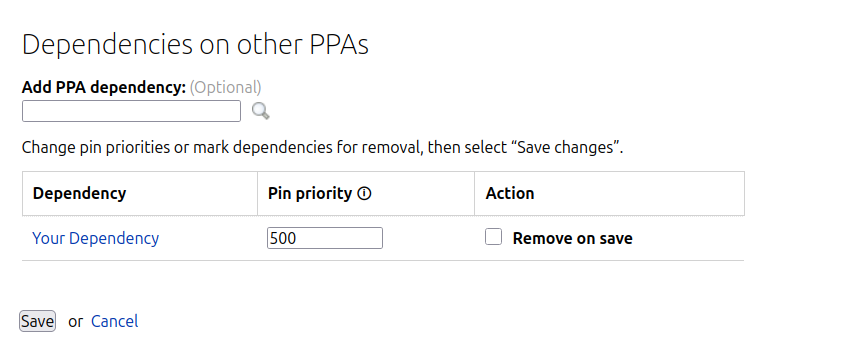
When Launchpad prepares a build, APT resolves versioning conflicts by selecting the package repository with the highest priority. Some values already have conventional meanings: 500 is the default for available packages, and 990 is generally used for packages from the configured target release. Values above 1000 are especially strong and may cause APT to select a package even when it is an older version. See APT’s documentation for more information.

To get started, open your PPA’s Edit PPA dependencies page and adjust the Priority field beside the relevant dependency. Save your changes to apply the setting to subsequent builds.

For teams that manage their PPA configuration through scripts or automation, priorities can also be configured through the Launchpad API. This can be done through lp-shell as follows:

# Run: lp-shell production devel


In [1]: target_ppa = lp.people["your-launchpad-id"].getPPAByName(

    name="your-ppa-name"

)

In [2]: dependency_ppa = lp.people["dependency-owner"].getPPAByName(

    name="dependency-ppa-name"

)


In [3]: target_ppa.addArchiveDependency(

    dependency=dependency_ppa,

    pocket="Release",

    component="main",

    pin_priority=1001,

)

Existing dependencies retain the default priority of 500, so there is no configuration change required if the current behaviour meets your needs.

Priorities apply to packages supplied by the dependency PPA, so choose them with the contents of that PPA in mind. They express a source preference; they do not freeze a particular package version or guarantee identical builds over time.

Additionally, PPA dependency pinning only affects the build environment on Launchpad. It does not change package preferences on the computers of people who install software from your PPA.

References

For more information, see:

Charm recipe uploads now authorize with Ubuntu SSO

Friday, August 28th, 2026

Launchpad builds charm recipes and uploads them to Charmhub on your behalf. Up until now, the uploads were authorized via Candid. Charmhub is retiring Candid and moving to Ubuntu One SSO, which is the same sign-on service that Launchpad already uses for snap recipes. 

We have updated Launchpad to use the new flow. When you authorize a charm recipe, you will now be taken to Ubuntu SSO instead of Candid to authenticate. The rest of the process, building and uploading, remains unchanged.

What you need to do:

You do not need to make any changes right now. 

Please note:

  • Recipes which were already authorized prior to this change will keep uploading with their existing credentials.
  • The new flow will apply the next time you authorize a recipe — either when creating a new charm recipe, or when re-authorizing an existing recipe.
  • Authorizations last up to a year, which is the maximum that Charmhub allows.

If you run into any issues while authorizing a recipe or uploading a charm, please let us know by contacting us via Matrix: #launchpad:ubuntu.com or asking a question.

Private snap manifests

Wednesday, May 13th, 2026

As part of our ongoing commitment to security and transparency, we are pleased to announce an improved approach to snap manifest generation for private projects. This update specifically addresses the long-standing technical block that suppressed the creation of manifest.yaml files during private snap builds, an important component for generating accurate Software Bills of Materials (SBOMs).

The challenge of secret exposure

Previously, manifest generation for private builds was deliberately disabled as a protective measure. The primary security concern was that including a snap manifest in a binary snap could inadvertently expose sensitive source credentials or internal build configurations.

While effective at preventing data leaks, this restriction also created significant hurdles for users wanting to produce SBOMs. Given that access to these private snaps is limited to those with explicit authorization, the risk of data and secret leakage is significantly reduced, allowing us to decommission the previous suppression mechanism.

What this means for developers

For private snaps built on Launchpad, the manifest.yaml will now automatically be included in binary snaps by default during the build process.

Looking ahead

We are continuing to refine our offering, providing more and better features that support enhanced security and efficiency.

We invite you to share your feedback on this change by reaching out  to us:

  • Matrix: #launchpad:ubuntu.com
  • Email: feedback@launchpad.net
  • Ask a question: https://answers.launchpad.net/launchpad

Launchpad mailing lists have been shut down

Wednesday, February 4th, 2026

As announced in Sunsetting Launchpad mailing lists, we have now shut down the Launchpad mailing lists hosting service.

For backup and archival, we have provided an archive of the public mailing lists at https://archive.lists.launchpad.net. All valid public lists.launchpad.net URLs that existed at the time of the shutdown now redirect to the archive, where the content will remain accessible. If you experience any issues with the archive, please report them by submitting a question or by contacting us on our Matrix channel, #launchpad:ubuntu.com.

Introducing Webhooks for Package Uploads in PPAs

Monday, December 1st, 2025

We have extended our webhooks capabilities to be able to trigger webhooks on successful and unsuccessful package uploads to Personal Package Archives (PPAs).

When a new source package is uploaded to one of your PPAs, the system can now send an instant webhook notification to an endpoint you control. This will make it easier to build automations around package uploads and binary package builds in your PPAs.

The webhook configuration includes scopes so you can configure to only trigger on successful use cases, or vice versa. Each webhook payload includes essential metadata about the upload – more details in the Webhooks page of our user documentation.

To try it out, you can add a webhook to your archive via the API (API reference), or via the UI by going to “Manage Webhooks” in your archive’s page.

If you have ideas or feedback, reach out to us!

Update on Launchpad mailing lists shutdown

Friday, September 19th, 2025

As announced earlier this year in our previous blog post: Sunsetting Launchpad’s mailing lists, Launchpad will retire its mailing list feature at the end of October 2025.

We would like to provide an update on the next steps in this process.

Our current plan is to stop accepting and sending emails to Launchpad mailing lists during the week of 13th to 17th October 2025.

If your team is still actively using or relying on Launchpad mailing lists, we recommend following one of the Migration Paths proposed on the previous blog post. If you do not see a clear way forward, please reach out to us to discuss, and see how we can help you:

  • Matrix: #launchpad:ubuntu.com
  • Email: feedback@launchpad.net

Phasing out Bazaar code hosting

Friday, June 6th, 2025

What is Bazaar code hosting?

Bazaar is a distributed revision control system, originally developed by Canonical. It provides similar functionality compared to the now dominant Git.

Bazaar code hosting is an offering from Launchpad to both provide a Bazaar backend for hosting code, but also a web frontend for browsing the code. The frontend is provided by the Loggerhead application on Launchpad.

Sunsetting Bazaar

Bazaar passed its peak a decade ago. Breezy is a fork of Bazaar that has kept a form of Bazaar alive, but the last release of Bazaar was in 2016. Since then the impact has declined, and there are modern replacements like Git.

Just keeping Bazaar running requires a non-trivial amount of development, operations time, and infrastructure resources – all of which could be better used elsewhere.

Launchpad will now begin the process of discontinuing support for Bazaar.

Timelines

We are aware that the migration of the repositories and updating workflows will take some time, that is why we planned sunsetting in two phases.

Phase 1

Loggerhead, the web frontend, which is used to browse the code in a web browser, will be shut down imminently. Analyzing access logs showed that there are hardly any more requests from legit users, but almost the entire traffic comes from scrapers and other abusers. Sunsetting Loggerhead will not affect the ability to pull, push and merge changes.

Phase 2

Updated timeline

From December 11th, 2025 (was September 1st in the first announcement), we do not intend to have Bazaar, the code hosting backend, any more. Users need to migrate all repositories from Bazaar to Git between now and this deadline.

Migration paths

The following blog post describes all the necessary steps on how to convert a Bazaar repository hosted on Launchpad to Git.

Migrate a Repository From Bazaar to Git

Call for action

Our users are extremely important to us. Ubuntu, for instance, has a long history of Bazaar usage, and we will need to work with the Ubuntu Engineering team to find ways to move forward to remove the reliance on the integration with Bazaar for the development of Ubuntu. If you are also using Bazaar and you have a special use case, or you do not see a clear way forward, please reach out to us to discuss your use case and how we can help you.

You can reach us in #launchpad:ubuntu.com on Matrix, or submit a question or send us an e-mail via feedback@launchpad.net.

It is also recommended to join the ongoing discussion at https://discourse.ubuntu.com/t/phasing-out-bazaar-code-hosting/62189.

Sunsetting Launchpad’s mailing lists

Thursday, May 22nd, 2025

What are Launchpad’s mailing lists?

Launchpad’s mailing lists are team-based mailing lists, which means that each team can have one of them. E-mails from Launchpad’s mailing lists contain `lists.launchpad.net ` in their address.

For more information on the topic please see https://documentation.ubuntu.com/launchpad/user/explanation/launchpad-mailing-lists/.

What are they not?

Please note that both lists.canonical.com and lists.ubuntu.com are not managed by Launchpad, but by Canonical Information Systems.

Timeline

Launchpad will no longer offer mailing lists as of the end of October 2025, which aligns with the end of the 25.10 cycle.

Migration paths

Depending on your use case, there are different alternatives available.

For a couple of years now, discourse has become a viable alternative for most scenarios. Launchpad also offers the Answers feature for discussions. If it is not so much about communication, but more about receiving information, e.g. for updates on a bug report, you should be aware that you can also subscribe teams to bugs.

Call for action

We are aware that your use case may be very different from the above listed ones. If you are using Launchpad’s mailing lists today and you do not see a clear way forward, please reach out to us to discuss your use case and how we can help you.

Please contact us on Matrix (#launchpad:ubuntu.com) or drop as a message via feedback@launchpad.net.

Please note that this is still work in progress, and we will provide more information over the upcoming weeks and months.