Posts Tagged ‘front-page’

Information sharing is now in beta for everyone

Tuesday, August 28th, 2012

Launchpad’s bug and branch privacy features are being replaced by information sharing that permits project maintainers to share kinds of information with people at the project level. No one needs to manage bug and branch subscriptions to ensure trusted users have access to confidential information.

Maintainers can share and unshare their project with people

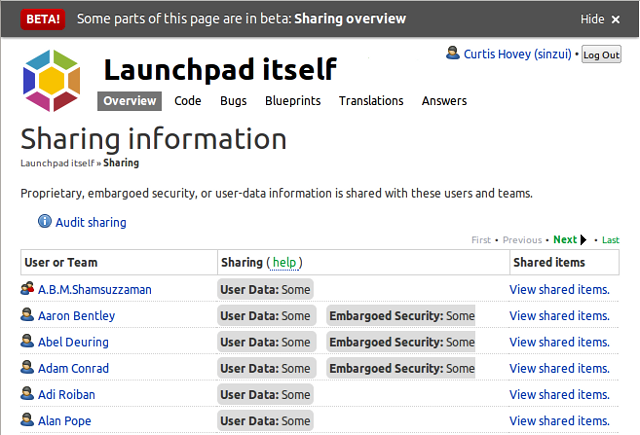
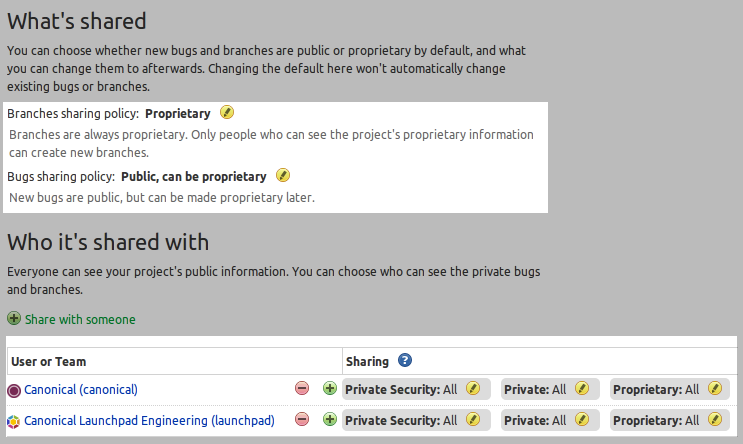
Project maintainers and drivers can see the “Sharing” link on their project’s front page. The page lists every user and team that the project shares with. During the transition period of the beta, you might see many users with “Some” access to “Private Security” or “Private” user information. They have this access because they are subscribed to bugs and branches. Maintainers can unshare with users who do not need access to any confidential information, or just unshare a bug or branch with a user. Maintainers can share share with a team to give them full access to one or more kinds of confidential information.

I have prepared a video that demonstrates the features (my apologies for the flickering)

Commercial projects can set bug and branch policies

Projects with commercial subscriptions can also change bug and branch sharing policies to set the default information type of a bug or branch, and control what types they may be changed to. Maintainers can set policies that ensure that bugs and branches are proprietary, and only proprietary, to ensure confidential information is never disclosed.
Sharing can be managed using API scripts

I maintain many project which have a lot of private bugs and branches. The sharing page lists a lot of people, too many to read quickly. I know most work for my organisation, but I don’t even know everyone in my organisation. So I wrote a Launchpad API script that can be run by any project maintainer to share the project with a team, then unshare with the team members. The members still have access to the bugs and branches and their subscriptions still work, but they will lose access to my project when they leave the team. This arrangement makes it very easy to manage who has access to my projects. share-projects-with-team.py is run with the name of the team and a list of projects to share with it.

./share-projects-with-team.py my-team project1 project2
Project maintainers can see private bugs

Monday, July 23rd, 2012

Project maintainers can now see all the private bugs in their project. While Launchpad tried to ensure the proper people could see private bugs in the past, the old subscription mechanism was brittle. Users could unsubscribe themselves and lose access, or retarget a bug to another projects which does not update bug subscriptions. The Purple squad migrated project configurations to project sharing so that all private information was shared with project maintainers. Project sharing ensures that confidential information is disclosed to the proper people.

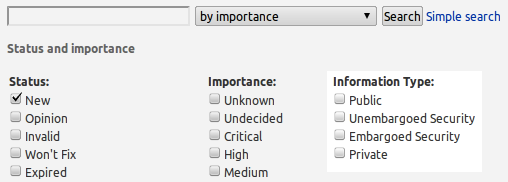
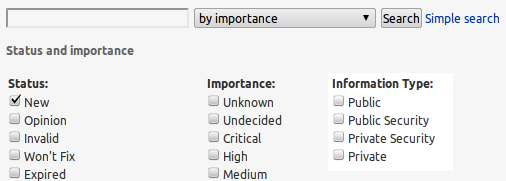
If you are a project maintainer, you might be surprised to find old private bugs that you have never seen before. This happened to me. Some ancient private bugs were in the “New” listing of bugs, other were buried in search results. You can search for just private bugs to review all private bugs.

advanced search for private information types

Privacy terminology is restored

We reverted the information type terminology changes introduced a few months ago.

  • User data ➙ Private
  • Embargoed Security ➙ Private Security
  • Unembargoed Security ➙ Public Security

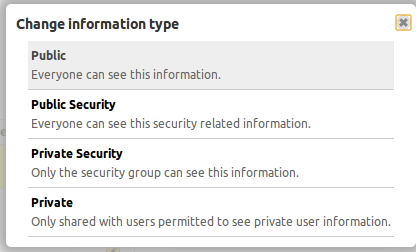
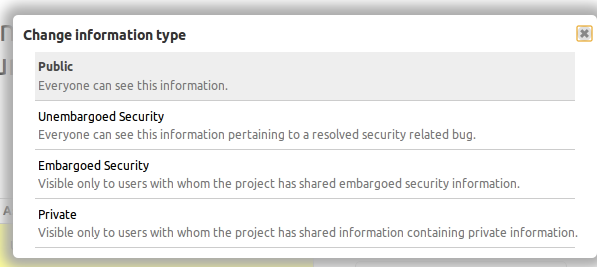
While the jargon-laden terms helped the small number of people who work with confidential information, the people who report bugs were confused. The most common reason for unwanted disclosure is that people enter confidential information, and cannot see how to make it private. Sometimes a user may not notice the mistake until a few minutes later. We also revised the descriptions of the information types to help new users quickly select the correct information type.

change information type

You can hide your bug and question comments

Monday, July 23rd, 2012

You can now hide your own bug and question comments. If you want to hide a comment made in error, you can use the “Hide comment” action.

hide your comment

You can see it, and even unhide it if you choose. The project’s maintainer or the trusted people delegated to work with private information can still see your comment.

your hidden comment

This allows you, or the people the project shares private information with, to hide just the comments that contain personal information. The bug does not need to be made private if the comment can be hidden. Project maintainers can also hide comments because they contain spam or abuse.


Bug reporting and search knows about privacy

Monday, July 16th, 2012

The Purple squad recently updated bug reporting and searching to understand the new privacy rules. Some of the changes were requirements to support sharing, others were opportunities we took advantage of.

Improvements to bug reporting and forms

The Purple squad updated the bug reporting UI to make it consistent with the bug pages. We choose to develop one consistent and tested UI rather than update the many kinds of widgets used in bug forms.

  • Project maintainers, drivers, and bug supervisors can report private bugs.
  • Autocomplete works with bug tags
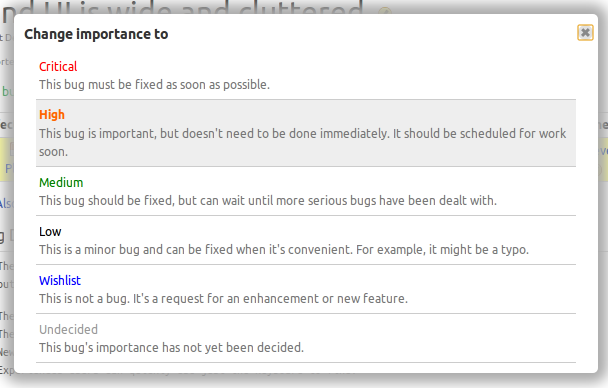
  • The status and importance controls show their definitions.
  • Undecided is the first importance because it is the default importance.

Improvements to bug searching

Advanced bug search was updated after we discovered that recent changes made it possible fix some long standing issues with a few additional lines of code.

  • Anyone can search for Private or Embargoed Security bugs that are shared with them.
  • Autocomplete works with bug tags.

Usability and Accessibility fixes

We discovered that the popups that show bug status, importance and information type did not work with keyboards. It was possible to tab out of every other kind of popup by accident. We made deep fixes to the code so that all launchpad popups work with keyboard.

  • You can use the tab key to move between the items in popups.
  • You cannot accidentally tab out of any popup.

Privacy and security replaced by information type

Monday, June 18th, 2012

Bug and branch information types

All users can now see the information type section that replaces the privacy and security section shown on bug and branch pages. This change allows users to clearly state the kind of information a bug or branch contains. Launchpad will soon permit project maintainers to share information types instead of managing individual bug and branch subscriptions. Project maintainers can see a link on their project’s front page to the  “Sharing” page. Sharing lists all the users and teams their project shares some private bugs and branches with. This list might be surprising. Launchpad Beta testers will soon be able share and unshare kinds of information to simplify management of whom the project discloses private information to.

See Reimaging the nature of privacy in Launchpad for more details.

How bug information types work with privacy

Wednesday, May 23rd, 2012

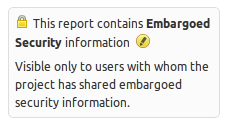
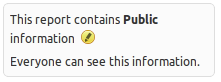
Launchpad beta testers are seeing information types on bug reports. Launchpad replaced the private and security checkboxes with an information type chooser. The information types determine who may know about the bug.

When you report a bug, you can choose the information type that describes the bug’s content. The person who triages the bug may change the information type. Information types may also change as a part of a workflow, for example, a bug may start as Embargoed Security while the bug is being fixed, then the release manager can change the information type to Unembargoed Security after the release.

Testing in phases

In the first phase of this beta, Launchpad continues to share private information with bug supervisors and security contacts using bug subscriptions. The project maintainer may be managing hundreds of bug subscriptions to private bugs, and people are getting unwanted bug mail.

In the second phase of the beta, the project maintainer can share information types with people…the maintainer is only managing shares with a few teams and users and people are not getting unwanted bug mail.

Watch the video of information types and sharing to see the feature in use and hints of the future.

Testing descriptions for bug status and importance

Tuesday, May 8th, 2012

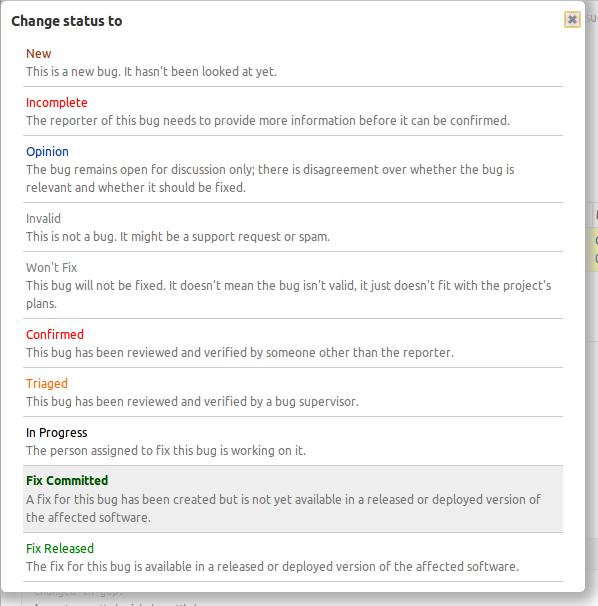
Launchpad beta testers will now see the descriptions of bug status and importance when making updates to the bug page. Launchpad pickers can now show the descriptions of the options you can choose.

Launchpad’s rules for defining a list of options you can choose have always required descriptions, but the only places you could see them were in some forms where they were listed as radio buttons. Bug status and importance where never shown as radio buttons, so their description were only know to people who read Launchpad’s source code. Users need to see the descriptions so that there is a common understanding of terms that allows us to collaborate.  The original bug importance descriptions were written in 2006 and only made sense for Ubuntu bugs. We revised the descriptions for the improved picker.

There has been a lot of confusion and disagreement about the meaning of bug statuses. Since users could not see the descriptions, we posted the definition on help.launchpad.net. Separating the status description from the status title did not end the confusion. We revised the descriptions for the improved picker, but I think we need to make more changes before showing this to everyone. The picker  appears to rely on colour to separate the choice title from description. Not all choices will have a special colour, and in the case of bug status there are two choices that appear to be the same grey as the description text:

The picker enhancements were made for the disclosure feature. We are changing the presentation of bug and branch privacy to work with the forthcoming project sharing enhancements. Early testing revealed that users need to know who will be permitted to see the private information when the bug is changed. This issue was similar to the long standing problem with bug status and importance. We decided to create a new picker that solved the old problem, that we could then reuse to solve the new problem.

Setting up commercial projects quickly

Wednesday, April 18th, 2012

Setting up a commercial project in Launchpad has gotten easier. You can now quickly register a proprietary project and enable private bugs. You can create private teams and private personal package archives, AKA private PPA or P3A without the assistance of a Launchpad admin.

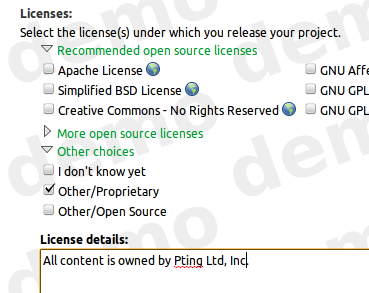
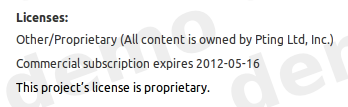
When you select the Other/Proprietary license while registering a project, or changing the project’s details,

it is given a complimentary 30-day commercial subscription.

The delay between the moment when a commercial project was registered and when the commercial subscription was purchased and then applied to the project caused a lot of confusion. During this delay, proprietary data could be disclosed. We chose to award the project with a short term commercial subscription which enabled the project to be properly configured while the 12-month commercial subscription was being purchased and applied to the project.

Any project with a commercial subscription can enable

Default private bugs
Once enabled by configuring the project’s bug tracker, all new reported bugs are private. You can choose to make the report public.
Default private bugs
Default private branches
You can request a Launchpad admin to configure private branches for your teams. (You will be able to do this yourself in the near future when projects gain proprietary branches.)

As the maintainer of a project with a commercial subscription, you can register

Private teams
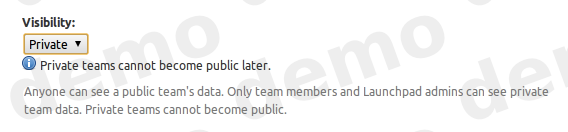
When you register a team, you can choose to set the team visibility to private. The team’s members and data is hidden from non-members.
Private mailing lists
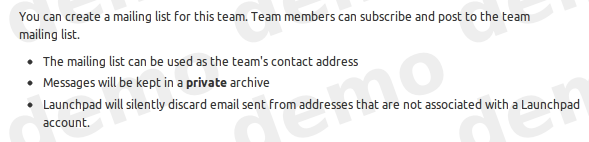
When you create a mailing list for a private team, the archive is also private. Only team members may see the messages in the archive.
Private PPAs
When you create a PPA for your public team, you may choose to make it private; private teams can only have private PPAs. You can subscribe users to your archive so that they may install packages without revealing all your team’s members and data to the subscriber.

A secondary benefit of this change is that you can now try Launchpad’s commercial features before purchasing a 12-month commercial subscription. The features will be disabled at the end of 30-days. Your test data will remain private to ensure your data is not disclosed.

Any open source project may also have a commercial subscription to enable commercial features. You can purchase a commercial subscription at the Canonical store. Commercial subscriptions cost US$250/year/project + applicable V.A.T.


(Photo by Fred Dawson on flickr, creative commons license)

An introduction to our new sharing feature

Friday, April 13th, 2012

Launchpad can now show you all the people that your project is sharing private bugs and branches with. This new sharing feature is a few weeks away from being in beta, but the UI is informative, so we’re enabling this feature for members of the Launchpad Beta Testers team now. If you’d like to join, click on the ‘join’ link on the team page.

What you’ll see

Project maintainers and drivers can see all the users that are subscribed to private bugs and branches. The listing might be surprising, maybe even daunting. You may see people who no longer contribute to the project, or people you do not know at all. The listing of users and teams illustrates why we are creating a new way of sharing project information without managing bug and branch subscriptions.

If you’re a member of (or once you’re a member of, if we want people to join) the Launchpad Beta Testers team, you can find the Sharing link on the front page of your project. I cannot see who your project is sharing with, nor can you see who my projects are sharing with, but I will use the Launchpad project as an example to explain what the Launchpad team is seeing.

The Launchpad project

The Launchpad project is sharing private bugs and branches with 250 users and teams. This is the first time Launchpad has ever provided this information. It was impossible to audit a project to ensure confidential information is not disclosed to untrusted parties. I still do not know how many private bugs and branches the Launchpad project has, nor do I even know how many of these are shared with me. Maybe Launchpad will provide this information in the future.

Former developers still have access

I see about 30 former Launchpad and Canonical developers still have access to private bugs and branches. I do not think we should be sharing this information with them. I’m pretty sure they do not want to notified about these bugs and branches either. I suspect Launchpad is wasting bandwidth by sending emails to dead addresses.

Unknown users

I see about 100 users that I do not know. I believe they reported bugs that were marked private. Some may have been subscribed by users who were already subscribed to the bug. I can investigate the users and see the specific bug and branches that are shared with them.

The majority

The majority of users and teams that the Launchpad project is sharing with are members of either the Launchpad team or the Canonical team. I am not interested in investigating these people. I do not want to be managing their individual bug and branch subscriptions to ensure they have access to the information that they need to do their jobs. Soon I won’t have to think about this issue, nor will I see them listed on this page.

Next steps — sharing ‘All information’

In a few weeks I will share the Launchpad project’s private information with both the Launchpad team and the Canonical team. It takes seconds to do, and about 130 rows of listed users will be replaced with just two rows stating that ‘All information’ is shared with the Launchpad and Canonical teams. I will then stop sharing private information with all the former Launchpad and Canonical employees.

Looking into access via bug and branch subscriptions

Then I will investigate the users who have exceptional access via bug and branch subscriptions. I may stop sharing information with half of them because either they do not need to know about it, or the information should be public.

Bugs and private bugs

I could start investigating which bugs are shared with users now, but I happen to know that there are 29 bugs that the Launchpad team cannot see because they are not subscribed to the private bug. There are hundreds of private bugs in Launchpad that cannot be fixed because the people who can fix them were never subscribed. This will be moot once all private information in the Launchpad project is shared with the Launchpad team.

Unsubscribing users from bugs

Launchpad does not currently let me unsubscribe users from bugs. When project maintainers discover confidential information is disclosed to untrusted users, they ask the Launchpad Admins to unsubscribe the user. There are not enough hours in the day to for the Admins to do this. Just as Launchpad will let me share all information with a team or user, I will also be able to stop sharing.


(Image by loop_oh on flickr, creative commons license)

Contacting teams is easier and more reliable

Tuesday, February 14th, 2012

Two changes to the contact team email feature were recently released that make communication more reliable.

Non-team members now see the “Contact this team’s admins” link. Previously, non-members saw a link to contact the team owner. The owner is often one person, and some team owners delegate the running of the teams to the team admins. There are often more admins then there are owners. So the message is more  likely to reach someone who is involved in the day-to-day team management.

Team members see the “Contact this team’s members” link. Previously, members might have seen a link to contact the team, but that email when to the team email address that the team might not respond to. Many teams still use bogus email addresses to avoid emails from the days before Launchpad had great bug subscription filters. Launchpad has an anti-feature that prevents team mailing-lists from contacts all the team members. Team admins found it impossible to notify the member about issue ranging from policy changes, polls, meetings, to security issues. So members can now trust that their messages will be sent to the team members.

The feature is a convenient way to contact a user or team. Sometimes the feature is the only way you can contact a user or team that does not have a public email address. A user may use the contact user/team feature 3 times each day. The limit ensures no one can spam Launchpad users. The limit also means the feature is not a substitute for mailing lists.